Ever watched a movie and thought, “I could write something like that”?
Every great screenwriter and filmmaker started somewhere — often inspired by a film, show, or book that sparked their imagination. Writing a script is a skill that can open doors to countless creative and professional opportunities, whether you dream of making it in Hollywood, producing an independent film, or simply telling compelling stories.
But where do you begin? How do you turn an idea into a structured, engaging, and cinematic script?
This guide breaks down scriptwriting step by step, making it easy for beginners to follow. By the end, you’ll have the tools and confidence to craft a polished script, ready to bring your vision to life.
Along the way, we’ll also introduce (or re-introduce) Celtx, an industry-favorite screenwriting tool designed to streamline the writing process — so you can focus on creativity instead of formatting.
Let’s get started!
What Is a Script?
A screenplay is not a finished product; a novel is. A screenplay is a blueprint for something – for a building that will most likely never be built.
Nicholas Meyer

A script is more than just words on a page. It’s the blueprint for an entire production that dictates what happens on screen, from dialogue to action to setting.
In short, a script is the DNA of any film, TV show, or stage play and serve multiple purposes:
- They provide a structured narrative for storytelling.
- They help directors and producers visualize scenes.
- They act as a communication tool between writers, actors, and crew members.
You may think that scripts are just for Hollywood blockbusters, but they’re not! They’re also essential for radio dramas, video games, training videos, and even podcasts. As we said, learning scriptwriting can open many doors in different creative fields.
Standard screenplay formatting uses 12-point Courier font, 1-inch margins on top, bottom, and sides (1.5 inch on the left), with approximately 55 lines per page, and dialogue starting 2.5 inches from the left.
Start writing your script today with the Celtx Script Writing Editor
Sign up Here (It’s Free!)
Pre-Writing: Developing Your Screenplay Idea
There are many steps to writing a screenplay, but the first is developing your idea!
Once you have a premise for your screenplay, it can be tempting to dive straight into writing. But before you start typing away, you need to develop and hone your idea.
Loglines and Synopses
There are several tools that can help you define your idea more clearly, starting with developing a logline. This is a one or two-sentence summary that captures the essence of your story.
An example of a logline would be:
A struggling musician gets a once-in-a-lifetime chance to perform on the world’s biggest stage – but only if he can overcome self-doubt and outshine his rival.
If your logline intrigues people, you’re on to something great!
For the full load-down on how to write a gripping logline, check out our article How to Write a Logline.
Next, expand your logline into a synopsis or one-pager which outlines the core story beats of your script.
Some writers go further and develop a treatment, a multi-page document detailing characters, major plot points, and themes. This step ensures you have a solid foundation before committing to a full script.
Outlining Your Story
Before you start writing, it’s crucial that you take the time to outline. This is especially the case if you’re new to screenwriting. Not only does it help you map out your story and ensure it flows smoothly, but also helps you prevent writer’s block.
An outline breaks your story into key scenes and sequences, helping you stay on track. Many writers used index cards, whiteboards, or software like Celtx to organize their ideas.
So, what does an outline include?
- Major plot points – a beginning, middle, and end.
- Character arcs detailing how your characters grow and change.
- Subplots – side stories that add depth.
- Important locations and settings that directly influence the story.
Script Formatting Basics
When it comes to writing the script itself, proper formatting is crucial because it ensures your script is professional and easy to read.
Industry professionals expect scripts to follow a standardized format, making it easier to visualize and produce the content.
Let’s look at the key elements of proper screenplay formatting:
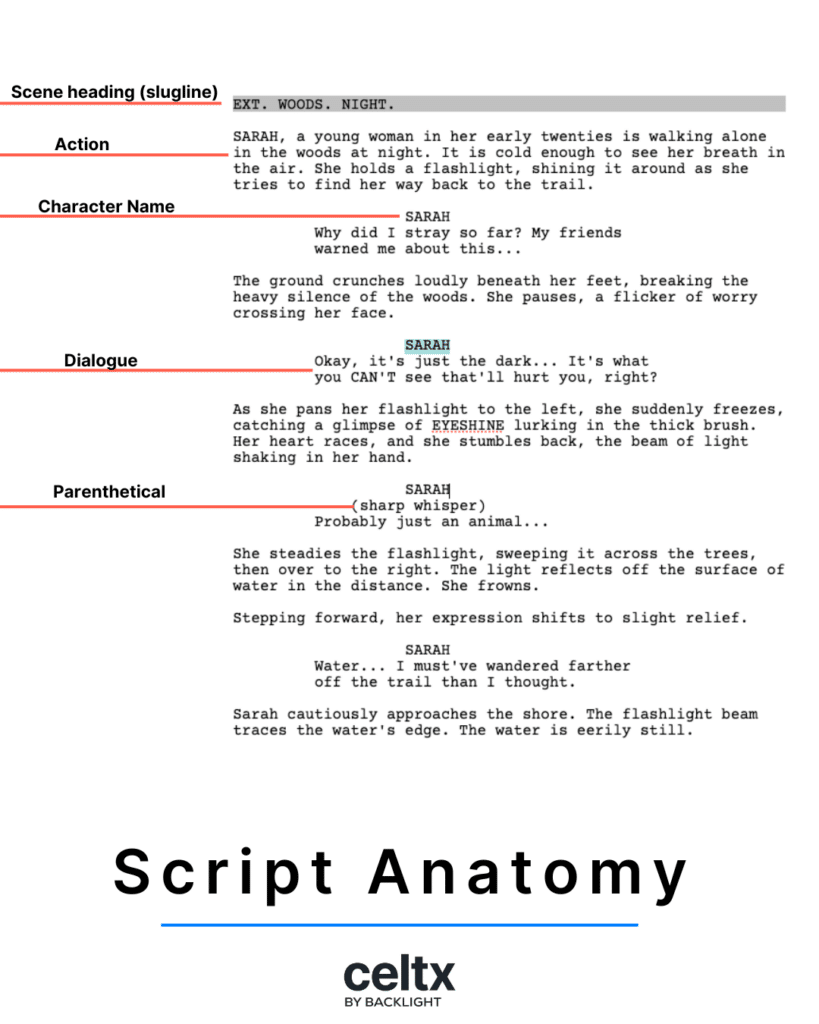
1. Scene Headings (Sluglines)
Each scene begins with a scene heading, also called a slugline. It tells the reader where and when the scene takes place.
Scene headings are always written in ALL CAPS and follow this structure:
INT./EXT. LOCATION – TIME OF DAY
For example:
INT. OFFICE – DAY
INT. means the scene takes place inside (interior), while EXT. means it’s outside (exterior). The location describes where the scene is happening, and DAY or NIGHT indicates the time.
2. Action Descriptions
Next come the action lines that describe what’s happening in the scene, including character actions, movements, and settings. This can also include montages.
These are always written in the present tense and should be as visual as possible, for example:
JASON walks into the dimly lit office, scanning the room. He spots LISA at her desk, nervously stirring a cup of tea.
Keep action lines concise and avoid overloading them with unnecessary details!
3. Character Names and Dialogue
When a character speaks, their name appears in ALL CAPS, centered above their dialogue. Like this:
JASON
(smiling)
Hey, Lisa. Long time no see.
Parentheticals like (smiling) provide additional performance cues for actors. While these can be helpful, you should you these sparingly to allow the director and actors to interpret the script in their own way.

4. Transitions
Transitions are optional screenplay elements and are mostly found in shooting scripts to indicate editing directions.
Examples of transitions include CUT TO: which indicates a direct transition to a new scene, FADE IN/FADE OUT which are used at the beginning and end of a screenplay, and DISSOLVE TO, a slow transition between scenes.
5. Formatting Software
Writing a script in a standard word processor can be extremely tedious due to screenplay formatting conventions.
All is not lost, however, as software tools like Celtx automatically format your script correctly. It means you have one less thing to worry about and more time to spend on your story and the content of your script.
For our full breakdown of screenplay formatting, check out our Screenplay Format Essentials article!
Script writing software for storytellers – Celtx. Try it Today for Free
How to Structure a Script
Most films and TV shows follow a typical three-act structure, broken into the setup, confrontation and resolution. It’s a structure that’s a great place to start for your own screenplay.
Three-Act Structure
Act 1 | Setup
The setup introduced characters, setting, and conflict. This act should establish the protagonist, their world, and the inciting incident that kicks off the story.
Act 2 | Confrontation
In Act 2, the protagonist faces escalating challenges, obstacles, and character growth. This is often the longest act of the three, including a major turning point or midpoint that raises the stakes.
Act 3 | Resolution
The story reaches its climax and conclusion. Here, the protagonist either succeeds or fails in their goal. Loose ends are also tied up to provide a satisfying ending for the audience.
Alternative Storytelling Methods
While the three-act structure is the more common, there are other approaches you can take when building your script.
Five-Act Structure
This is mostly used in TV dramas and classic plays, such as Shakespearean works. The five-act structure divides the story into exposition, rising action, climax, falling action, and resolution. Essentially, it’s an extension of the three-act structure.
The Hero’s Journey
Coined by Joseph Campbell, the hero’s journey is a classic storytelling arc used in adventure and fantasy, where a hero undergoes a transformation through trials and growth.
Nonlinear Narratives
Here, events aren’t presented in chronological order but still form a cohesive story. If you’re looking to write a nonlinear narrative, then films like Pulp Fiction and Memento are great starting points for inspiration!

Whichever structure you choose to adopt for your screenplay, it’s important that you fully understand how it works for you to create a compelling and dynamic narrative that holds the audience’s attention.
Writing Realistic Dialogue
Dialogue is what brings your character to life, moves the story forward, and reveals emotions, personalities, and motivations.
Writing dynamic dialogue does take practice, but here are our top tips to improve it:
Dos and Don’ts
Dos
- Keep your dialogue concise and meaningful, with every line serving a purpose.
- Ensure each character has a distinctive voice that reflects their personality, background, and experiences.
- Use subtext because characters don’t always say what they mean.
- Read your dialogue aloud to check for natural flow and rhythm.
Don’ts
- Overuse exposition. Make sure to avoid having characters explain things the audience can figure out visually.
- Write long-winded monologues unless absolutely necessary.
- Make all characters sound the same; different people speak in different ways.
Tools for Improving Dialogue
To up your dialogue game even more, we highly recommend reading professional scripts to analyze how dialogue is written in successful films.
You can also improve your dialogue by having others read your work and provide feedback. Our collaboration feature in Celtx allows you to easily gather thoughts from your fellow writers and people you trust.
For more on writing captivating dialogue that feels real, click here.

Script Revisions & Feedback
There’s always room for improvement and this also goes for screenplays. Writing your script is just the beginning and revisions are where the magic truly happens!
Most professional writers go through multiple drafts, refining characters, dialogue, pacing, and overall story structure. So, why do rewrites matter?
Well, first drafts are never perfect. Their purpose is to get ideas onto the page. Next, come the rewrites which eliminate unnecessary scenes, tighten the plot, and refine character arcs. Never be afraid to edit your work! Here’s how you can go about it:
Revising Your Script in 7 Steps
- Take a Break
Step away from your script for a few days or weeks so you can return to it with fresh eyes and a new perspective! - Read it Out Loud
Hearing your words aloud can help you spot awkward phrasing and unnatural dialogue. Celtx even has a read-through feature which assigns voices to your script, allowing you to hear it without the need for multiple actors. - Analyze the Structure
Next consider whether the story flows well. Is there a clear beginning, middle, and end? - Cut the Fat
Remove unnecessary scenes, redundant dialogue, and slow sections. - Strengthen the Characters
Ensure each character has a unique voice and motivation - Refine Dialogue
Make the dialogue sharper, more natural, and full of subtext - Seek Feedback
Here is where your networking skills come in! Share your script with trusted peers, writers’ groups, or script consultants through Celtx’s collaboration tools for real-time feedback.
How to Write a Script: Step by Step
Okay, now let’s put all of the pieces together and run through it all before you hit the ground running on writing your very own script!
- Start with a strong idea
Brainstorm your story, define the genre, and identify the main conflict.
- Write a logline
One or two sentences summarizing your story’s core.
- Outline your story
Break it into acts, major beats, and key scenes.
- Draft your scenes
Focus on action lines, dialogue, and pacing. Don’t worry about perfection yet.
- Format your script
Follow industry standards for scene headings, character names, and spacing. Google Docs works, but screenwriting software like Celtx can make this seamless.
- Revise and polish
Read aloud, check pacing, sharpen dialogue, and get feedback from peers or collaborators.
Next Steps: What to Do with Your Finished Script
Once your script is polished, it’s time to get it noticed.
Submit it to top screenwriting contests like the Nicholl Fellowship and Austin Film Festival for industry exposure. If you’re aiming for Hollywood, consider finding an agent or manager by networking and sending query letters.
For our full run down on contests and fellowships, click here.
Perfect your pitching skills by developing a strong logline, a concise summary, and be prepared for questions.
Tools like Celtx can help with pre-production planning, collaboration, and formatting, making your script submission-ready for contests, agents, and producers.
Read more about what to do with a finished script in our dedicated piece: Finished Your Script? Here’s What to Do Next
FAQs
No — you can start in Google Docs or Word. However, dedicated software like Celtx saves time with automatic formatting, shortcuts, and built-in templates.
Feature-length scripts usually range from 90–120 pages. Shorts are typically 1–30 pages depending on runtime.
Follow WGA formatting guidelines: proper scene headings, dialogue formatting, page layout, and spacing. Templates in Celtx or other screenwriting software help ensure compliance.
Begin with a logline, outline, or a compelling opening scene — whatever helps you get the story moving while staying focused on the main conflict.
Most scripts follow a three-act structure: setup, confrontation, and resolution. Breaking your story into acts and key beats makes writing smoother.
Conclusion
Writing a script is both an art and a craft. The journey from idea to polished screenplay requires patience, discipline, and persistence. By following this guide, from brainstorming and outlining to formatting, revising, and pitching, you can create a compelling, professional-quality script.
But remember, writing is rewriting. Keep refining your script, seek feedback, and don’t be discouraged by rejection. Every successful screenwriter started where you are now: with a blank page and a dream.
So, what are you waiting for? Start writing your script today and let your creativity shine. Writing a particular genre? Explore our comprehensive screenplay writing guide Mastering the Art of Screenwriting for deep dives into everything from drama to comedy to horror! And if you need an extra boost, try Celtx, the perfect tool to streamline your scriptwriting process.
Focus on your story, not your formatting.
Let Celtx’s Script Editor automatically apply all industry rules while you focus on the story.
Up Next:
How to Format a Screenplay (FREE Template)
Now that you know how to write your script, formatting is the next crucial step. Learn industry-standard layout for scene headings, dialogue, and action lines — plus download a free template to get started.