You just can’t stop that killer movie idea darting around your mind, just refusing to go anywhere. It’s time to put your ideas onto paper (or screen) and start writing your screenplay. This can be a formidable prospect at first, especially when it comes to the many screenplay formatting rules.
Here at Celtx, we’re here to dispel the thinking that screenplay formatting has to be complicated. Once you’ve armed yourself with standout screenwriting software, and have mastered the basics, you’ll be free to spread your creative wings, and write your script.
So, let’s explore the conventions of screenplay formatting and how you can ensure your work is written to industry standards.
What is a Screenplay?
A screenplay is a document which scripts a movie, or TV pilot. It includes details on the visuals that the audience will see on screen, as well as the accompanying dialogue spoken by the characters.
Screenplays can vary in length, with short films starting at 1 page, all the way to 30 pages. TV pilots can be anywhere from 25 pages to 60 pages, and feature-length movies from 70 to 180 pages (most movies will be around the 110-page mark.
We’ll discuss page counts and time frames later in the article.
Why is Screenplay Formatting So Important?
It’s common to consider screenplay formatting as pernickety and unnecessary, a way to stifle the creativity in screenwriters. In reality, formatting has a crucial role to play in the overall filmmaking process.
It is important to note that filmmaking is a collaborative art, with the script being the blueprint. All departments from the director to special effects will need the script to do their job to the best of their ability, so it needs to be consistent in its format to be understood and interpreted by everyone.
Film budgets and shooting schedules also rely heavily on the script. Without it, films can spend too much money too quickly, jeopardizing the production.
Screenplay Formatting Standards
Font
We all have our preferred fonts when it comes to writing. Whether you are a traditional Times New Roman enthusiast or prefer more modern fonts like Arial or Calibri, fonts and their size can shape how we write and our enjoyment of writing.
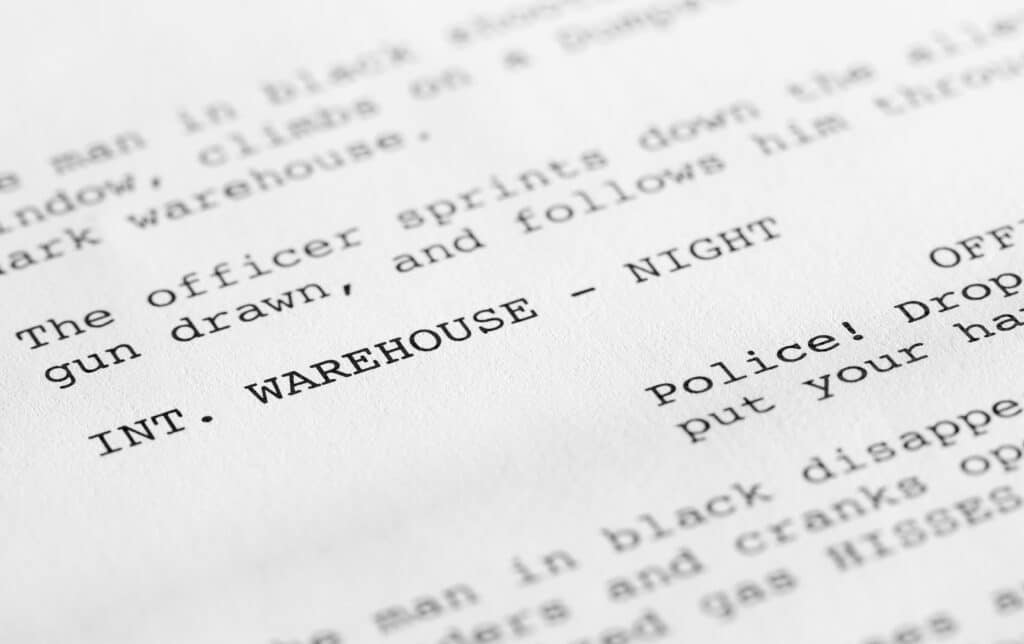
When it comes to screenplays, there is a standard font and size. All use Courier font style, at size 12-point. The reason the same font is consistently used in the industry, is to make it straightforward to ascertain an estimated screen time based on the number of pages written.
It may be tempting to use your preferred font, but do not give in! If you do, your script will come across amateurish and will be tossed aside almost immediately, even if it is the next blockbuster hit.
Margins and Spacing
Another factor that contributes to the page count and screen time estimation are the margins and spacing between the elements on the page.
- Left-hand margin: 1.5 inches (to leave space for the screenplay binding once printed)
- Right-hand margin: 1 inch
- Lines per page: 55
- Character names: Uppercase and start 3.7 inches from the left-hand side of the page.
- Dialogue lines: Start 2.5 inches from the left-hand side of the page.
- Page numbers: Top right-hand corner, 0.5 inches below the top of the page (note that the title and first pages are not numbered).
With the evolution and constant development of screenwriting software, it is not necessary for you to manually apply these formatting conventions yourself, however, they are always useful to keep in mind.
Script Length & Page Counts
As mentioned previously, screenplay lengths can vary based on the type of project and even the genre, with most comedy movies sitting around 90 pages, and the action/drama genres at 110 pages.
A general rule of thumb is that one page of script roughly equals one minute of screentime. So, 90 pages is around one hour and a half, and 110 pages is around one hour and fifty minutes.
That does not mean you have to aim for these run times, as it’s more important your screenplay is as lean and compelling as possible. You want to keep your audience always engaged.
Screenplay Element Categories
Start and End of Act
Structure is crucial in any screenplay, ensuring you are hitting the right plot points at the right time. It isn’t necessary but can be beneficial to separate your script into acts, especially if you’re writing for television.
For example, most comedy shows will have a teaser (one to two pages), followed by three to five acts. To separate the acts, type in the name of the act at the beginning of your script and underline it.
Let us look at our script example to show how this would be formatted.
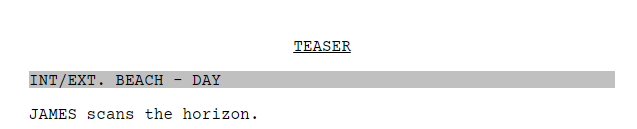
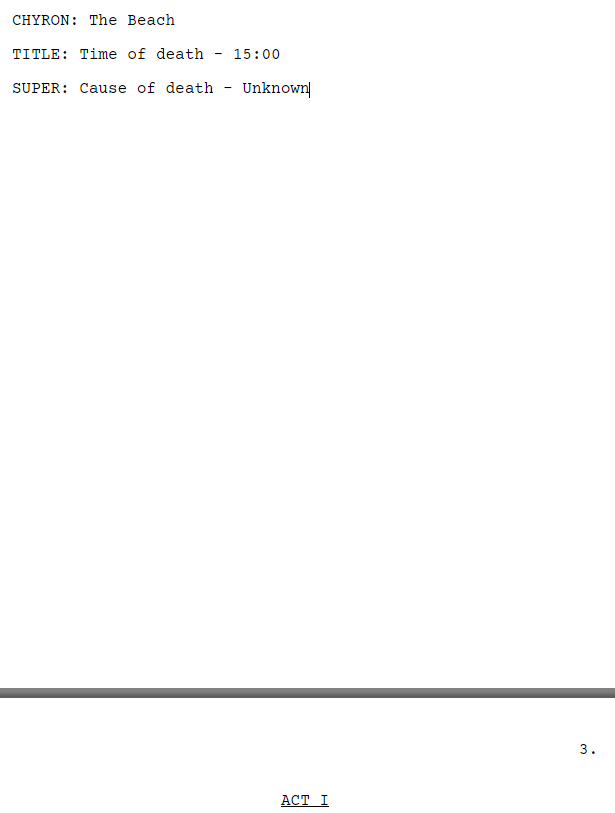
At the end of the act, click on NEW ACT in your chosen screenwriting software and it will automatically start a new page, clearly showing the separation:
Scene Headings
Scene headings act as the logistical anchors of your screenplay. Their primary job is to orient the reader in time and space, clearly earmarking exactly where and when a new scene begins. In the industry, these lines are commonly referred to as sluglines.
A standard heading is always written in all caps and follows a simple formula: INT./EXT. LOCATION – TIME. For example:

While these details may seem minor, they are the foundation of your script’s structure. Producers and directors use these headings to build the production schedule, organize night shoots, and coordinate department heads for continuity.
Because sluglines are so critical to the professional “read” of your script, mastering the nuances of when to use subheadings or hybrid markers (like INT./EXT. for moving vehicles) is essential. For a complete technical breakdown and professional examples, check out our definitive guide on What is a Slugline?
Action Lines
Directly below the scene heading are your action lines. In professional screenwriting, these lines serve as the visual narration of your story. They must be written in the present tense and describe only what the audience can see or hear on screen in real-time.
Unlike a novel, a screenplay is a technical blueprint for a production. Your action lines should be lean, visual, and focused on “shootable” details. For example, when you first introduce a character—such as JAMES or a SHADOWY FIGURE—you must capitalize their name in the action line. This allows the production team to quickly identify new cast members and plan for hair, makeup, and wardrobe.
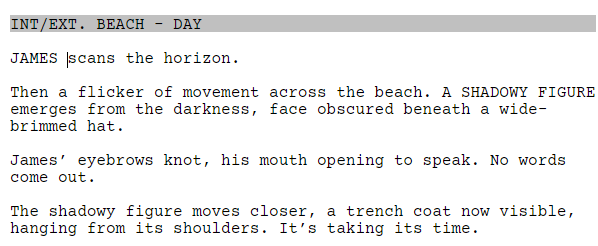
You should also use action lines to “flag” critical props and loud sound effects that will require preparation from the art and sound departments. Because the “read” of your script depends on the rhythm of your descriptions, mastering the economy of words is vital. To learn the professional rules for formatting and phrasing high-impact visuals, explore our complete guide on how to write action lines that make your script move.
Character Names
When dialogue appears in a scene, we need to identify the character speaking. You don’t necessarily need to use their name, but what best identifies them.
For example, if your character’s name is John McClane (Die Hard franchise), a determined police detective, he would be identified in his work as McClane. Hence the best way to present him would be by that name. If John McClane was instead the lead in a carefree romantic comedy, you may refer to him as John.
If your character has an alias, such as Peter Parker, more commonly known as Spiderman, you would refer to each separately depending on who they are portraying in the scene even if they are in reality the same person. Alternatively, when Peter Parker becomes Spiderman, a slash could be incorporated e.g. Peter Parker/Spiderman whenever he’s in his superhero get-up.
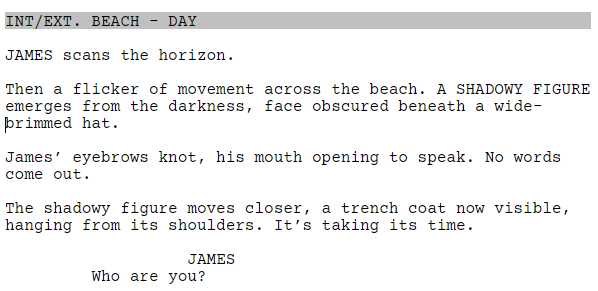
As you will see from our above example, James is introduced in capitals at the start of the scene on his first appearance, his first line of dialogue prefaced by the same name. We can clearly see that James is meant to be speaking.
Dialogue
In the architecture of a screenplay, dialogue is the audible expression of your character’s internal world. It is the primary tool used to reveal emotion, motivation, and the specific goals driving your protagonist.
Visually, dialogue always sits centrally on the page, positioned directly underneath the character’s name. This distinct indentation ensures that actors can instantly identify their lines and leaves ample “white space” in the margins for production notes.
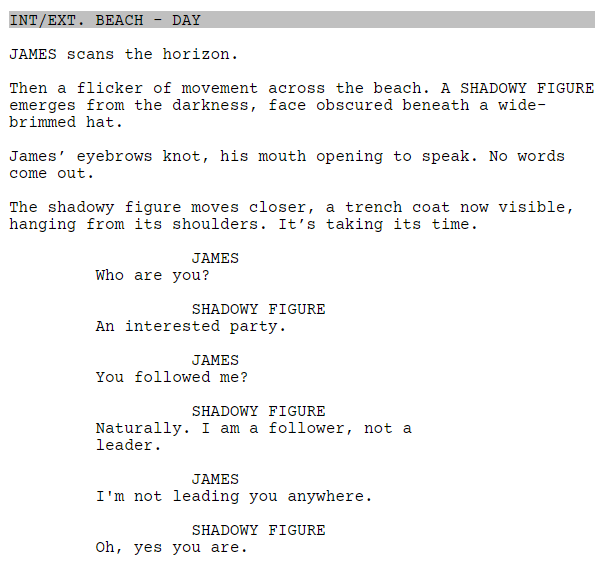
While the words themselves drive the scene’s emotion, professional scripts often require technical “extensions” to tell the crew how that dialogue is heard—such as Voice Over (V.O.) for narration or Off-Screen (O.S.) for a character in another room. Because great dialogue is as much about what isn’t said as what is, mastering the balance of subtext and technical formatting is a career-long journey. To see professional examples and learn how to write conversations that pop off the page, read our comprehensive guide on what is dialogue.
Parentheticals
While extensions tell us how the audience hears the dialogue, parentheticals tell us how the lines are spoken. Intended for actors to help direct them to their characters’ internal thought processes and emotions, parentheticals help create a dynamic and complex scene.
Parentheticals can be emotions, or actions for actors to perform as they speak the line of dialogue.
We have used both an inflection and action in the above example to give the actors an indication, both of the emotion behind their dialogue, and what they’re doing whilst talking.
Of course, the Shadowy Figure could be laughing, crying, shouting, whispering, or delivering the line in any other way. As the screenwriter, it is up to you to indicate where you feel a line needs to be delivered in a certain way.
It is crucial not to overuse parentheticals, however, as too many can make a script look crowded. It also doesn’t allow the directors and actors to interpret the story and the characters from their perspective. Remember, filmmaking is a collaborative process.
Learn more about parentheticals in our dedicated article: What are Parentheticals?
Transitions
While sluglines orient the leader and parentheticals indicate dialogue details to the director and actors, scene transitions act as technical instructions for the editor. They signal exactly how one scene should flow into the next. In professional formatting, these markers always sit flush against the right-hand margin.
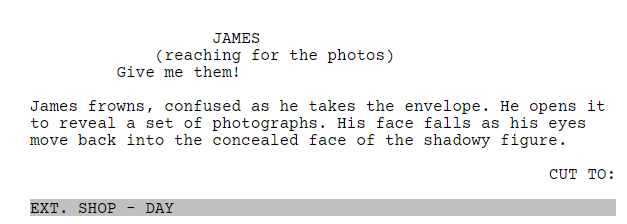
Transitions are powerful tools for controlling the “rhythm” of your film. However, you should use them sparingly. Modern industry standards favor “white space,” and over-formatting can stifle an editor’s creativity. Common structural transitions include:
- CUT TO: The most standard bridge between two scenes.
- SMASH CUT TO: An abrupt, high-impact shift used to emphasize a sudden change.
- DISSOLVE TO: A softer transition typically used to show a passage of time.
- MATCH CUT TO: A creative link where a visual or audio element in one scene mirrors the start of the next.
- INTERCUT: A structural tool for simultaneous action, most commonly used for phone calls.
Knowing which transition to choose depends on the emotional impact you want to deliver. To see these techniques in action and learn the professional rules for their use, explore our complete guide to scene transitions.
Subheaders
Sub-headers are mini scene headings that break a scene into separate places or times. When using screenwriting software, these will still come under scene headings.
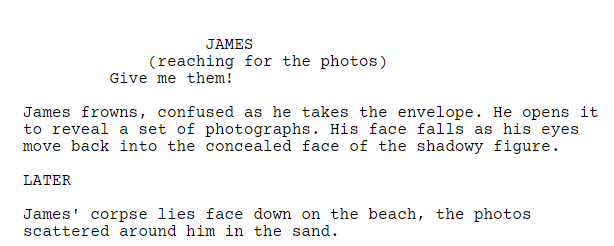
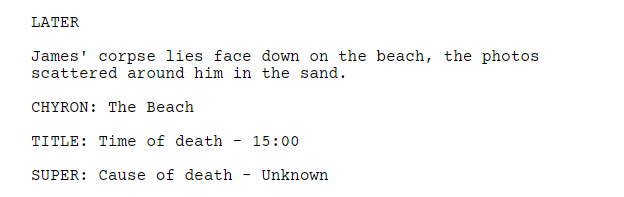
Notice the sub-header in capitals between the two sets of action lines. We are still on the beach, but time has elapsed. This allows the script to flow and indicates to a director that they won’t need to change locations for this change from one time frame to another.
Shots
Shots are usually formatted within the action lines and highlight a specific way something is presented on screen through camera angles, movements, or shots.
They are mostly adopted by writer-directors who want to note down a specific vision, but sole writers can also use them to direct the director to a particular visual if they see fit.
Too many indicated shots can take readers out of the story you are trying to tell, so try not to get too carried away and leave the directing to the director as much as you can.
Let’s return to John Wick (2014) and look at the opening page of the script. You will see writer Shay Hatten has indicated an extreme close up to emphasize the Makiwara board and the fist connecting with it.
This introduces us to the protagonist, showing his strength and abilities. Our interest is immediately peaked as we see John’s might, hooked into what his other potential capabilities could be.
Notice the close up shot is indicated in capitals and bold in this instance within the action lines.
Montage
Montages are a popular device used to show a passage of time through various events. There are a few different options you have when formatting montage, which you can explore in greater detail here.
Many writers like to format montage using bullet points, rather than writing separate scene headings for each new moment. Take this example from Pretty Woman (1990) when Vivian is trying on various outfits:
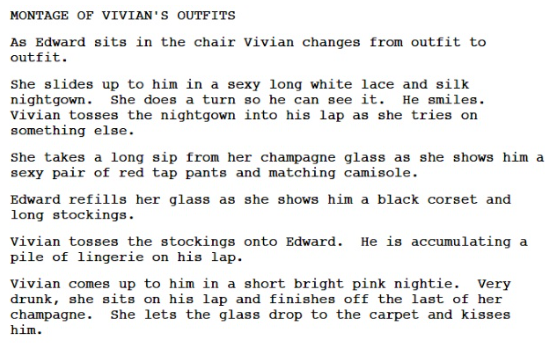
Realistically, montage formatting is very much a stylistic choice dependent on you as a writer and how you prefer to write montage. All that matters is the action is clear.
Learn more about montages: What is a Montage? Definition, Types & Examples Across Film Genres.
Chyrons
Text appearing over the screen, such as a movie title, language subtitles, or to indicate a specific time and place are known as chyrons.
In our example script, we’ve used three options for chyrons. All are written in capitals, and all can be used depending on your personal preference. SUPER stands for superimposed.
Writing a Screenplay
Now that we’ve covered all the elements of a screenplay and their formatting conventions, it’s now time to start writing. You shouldn’t need to manually format and move margins around to produce an industry standard script.
Screenwriting software such as Celtx does all the hard work for you so you can focus on crafting a smash hit of a movie or TV show. Whatever your choice of software, free or paid, we recommend finding one that works for you as a writer and helps you be productive.
Frequently Asked Questions (FAQ) About Script Structure
As with all creative pursuits, how long is a piece of string? If you are about to write your first screenplay, it will probably take more time than someone who’s been writing scripts for 25 years. The key thing is to go at your own pace. No writer or script project is the same.
Yes. Every screenplay should start with a title page that includes your script’s title, your name, and contact information. Celtx automatically formats a professional title page for you.
All title pages will include:
– Script title
– Name of writer
– Space for revision details
– Space for contact details and any copyright information (bottom left corner)
Learn more about how to format a title page here.
Most screenplays follow a three-act structure: setup, confrontation, and resolution. Within that framework, scenes are built using elements like slug lines, action lines, dialogue, and transitions.
A feature film script typically runs between 90 and 120 pages — roughly one page per minute of screen time. Celtx’s page count tools help you track pacing as you write.
While you can technically write a script in any word processor, screenplay software like Celtx handles formatting automatically—so you can focus on storytelling instead of margins and indents.
Test it with beat sheets or scene outlines. Tools like Celtx’s Story Development features help visualize your story flow and identify gaps before you start rewriting.
Conclusion
Every great screenplay starts with structure — but it’s how you use it that makes your story stand out. Structure gives you the framework, not the formula. Once you understand the rhythm of a scene or the weight of a transition, you can start bending the rules in ways that feel intentional and bold.
Celtx gives you the space to experiment — to draft, revise, and rebuild your story until every beat lands just right. Because learning your craft isn’t about getting it perfect the first time — it’s about finding your flow and building confidence with every page you write.
Focus on your story, not your formatting.
If you’re ready to start writing (without worrying about structure):
Up Next:

Story Arc: What It Is, Types, and Examples from Film & TV
Structure is the skeleton of your script, but the story arc is the heartbeat. Now that you’ve mastered the professional framework for your scenes, discover how to channel that structural tension into a narrative journey that resonates