Every great film, video or commercial starts with a strong vision. It’s turning that vision into a visual product that requires organization, planning, and communication.
That’s where shot lists and storyboards come in: two pre-production tools essential for translating abstract ideas into concrete plans. While they may seem similar at first glance, they serve very different purposes.
So, we’re here to demystify them for you! In today’s blog, we’ll uncover the key differences between a shot list and a storyboard, explain why they’re both important, and show you how you can use them together for a smoother more efficient shoot. Whether you’re a filmmaker, content creator, or marketing professional; this blog is for you!
Let’s get started!
Table of Contents
- Shot List vs. Storyboard
- Differences vs Similarities
- When to Use a Shot List
- When to Use a Storyboard
- Benefits of using Both
- When You May Not Need Both
- Shot List and Storyboarding Tools
- Conclusion
Shot List vs. Storyboard
First, we’ll cover the basics: what is a shot list and what is a storyboard?
What is a Shot List?
A shot list is a detailed breakdown of every individual shot that will be captured during a shoot.
Think of a shot list as a practical to-do list for the director and cinematographer. It outlines exactly what needs to be filmed, from camera angles and movements to the lens type and location.
A typical shot list includes:
- Scene and shot numbers
- Types of shot (wide, close-up, over-the-shoulder, etc.)
- Camera angle and movement
- Subject/s in the frame
- Equipment needed (lenses, lights, rigs)
- Notes or special instructions
Camp Films dive deeper into the shot list in this comprehensive must-watch video:
Shot lists are organized and technical, essential on set for keeping things running smoothly, efficiently and in the right order.
Want to dive deeper into the shot list? Click here for our awesome guide.
What is a Storyboard?
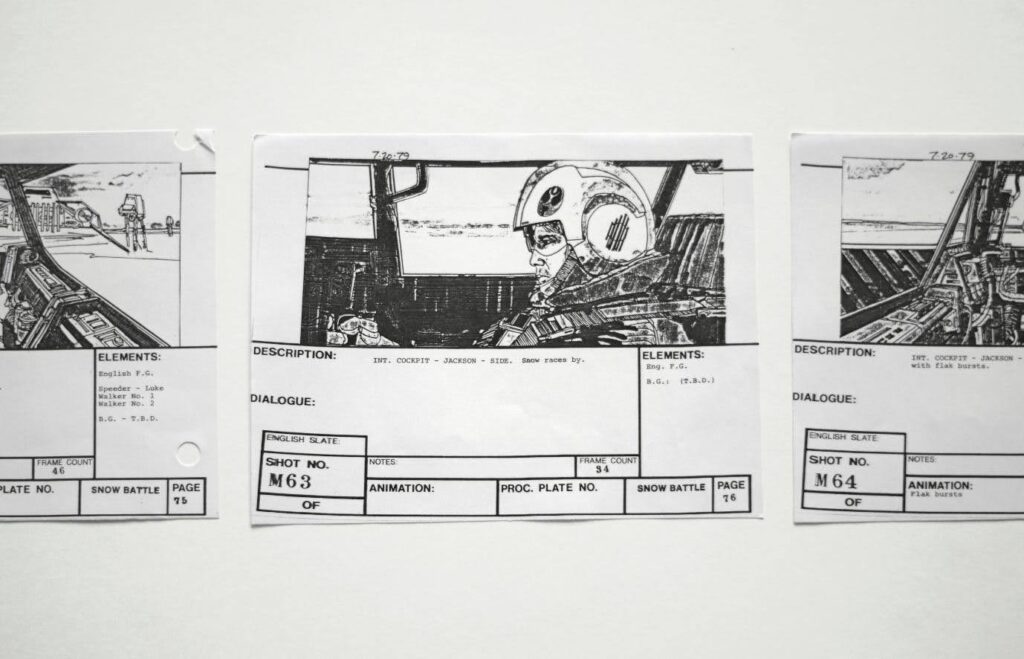
A storyboard is a visual representation of a project, laid out as a sequence of drawings or images that show how the story will unfold shot by shot.
Each panel represents a specific scene or moment, often accompanied by notes about movement, dialogue, sound, and other details.
Storyboards help to:
- Visualize narrative flow
- Communicate the director’s vision to the crew
- Explore pacing, composition and transitions
- Pre-visualize complex sequences (like action scenes or effects)
Think of a storyboard as a comic book version of your project, giving everyone a shared visual reference to work from.John Davis, renowned storyboard artist for movies such as The Departed, Black Swan, and Zoolander sums up the role of the storyboard in storytelling perfectly:
There’s an awareness factor that needs to be in storytelling. To engage the audience in a way that they’re surprised and taken by it. – John Davis, Lecture for New York Film Academy (2017)
For more knowledge on storyboards and how they work, we also have a dedicated blog. Click here to read more.
Differences vs Similarities
Now we know a little more about shot lists and storyboards individually, let’s compare them side by side. Although they are closely related, they serve distinct functions:
| Feature | Shot List | Storyboard |
| Format | Text-based | Illustrations or sketches |
| Purpose | Organize logistics | Visualize narrative |
| Audience | Director, Director of Photography, Camera crew | Director, Art Department, Clients |
| Detail | Technical | Creative |
| Usage | During production | During pre-production |
| Flexibility | Often adjusted on set | Refined during planning |
| Output | Production schedule and shot plan | Story flow and visual continuity |
While the shot list and storyboard have quite different purposes, there are a few similarities:
- Both help clarify the director’s vision
- Both increase efficiency during the shoot
- Both improve communication between departments
- Both can be used together in pre-production planning
When to Use a Shot List
We now know that shot list are used during a production, but exactly when and how? Let’s explore that next:
During Pre-Production
Once the visual tone and flow of a story are established through the storyboard, the shot list comes next. Each frame or scene is broken down into its technical components and bridges the gap between concept and shooting.
In short, the shot list shows how the storyboard and the vision it presents is filmed.
How you frame the shot, where you place the camera, and what subjects you choose to show in the frame — those are the nouns, verbs, adverbs and prepositions of the language of motion pictures – Jay Holben, Cinematographer, ShotCraft (2020)
On Shoot Days
Talking of shooting, a shot list will then function as a roadmap for production. It tells the crew what to shoot, when, and how.
The director and DP stay focused and aligned, ensuring the entire crew is always on the same page.
Having a shot list also makes it easier to prioritize shots based on location or lighting, schedule efficiently, especially with limited time and resources, and track progress, staying on schedule.
For Budget and Time Management
Knowing exactly what needs to be shot helps producers allocate resources wisely. A detailed shot list minimizes wasted time, keeps the shoot within budget, and ensures all the necessary footage is captured.
When to Use a Storyboard
So, a storyboard generally comes before the shot list, right? Yes, and here’s why:
During Early Pre-Production
Storyboards come in early, often right after the screenplay is finalized. They’re used as a creative exploration tool to start with, helping filmmakers figure out how the story will look visually.
Often, filmmakers will experiment with pacing, angles, and transitions before even picking up the camera.
To Communicate a Creative Vision
A storyboard is essential when working with clients, investors and team members as they visually explain how the final project will look, be it a movie, advertisement or short video.
Storyboards are a powerful communication tool, especially for people who aren’t so familiar with technical jargon.
During this stage of the production process, storyboards are great for:
- Pitching a commercial concept to a client
- Collaborating with an art director on set design
- Explaining timing and flow to an editor or animator

To Plan Complex Sequences
Action sequences, visual effects, and dialogue-heavy scenes hugely benefit from a storyboard. Filmmakers can pre-visualize the motion and composition before spending tons of time and money on elaborate or costly shoots.
Benefits of using Both
Using both a shot list and a storyboard isn’t redundant. In fact, it’s a smart move! Here’s why:
Creative and Practical
Storyboards give you the ‘what’ and ‘why’ whereas shot lists give you the ‘how’ and ‘when’. Together, they provide a comprehensive blueprint that ensures everyone, from the creative team to the technical crew, is aligned.
Fewer Mistakes and Fewer Reshoots
When everyone understands the vision and logistics, things so more smoothly. A crew is less likely to miss crucial shots, make continuity errors, or waste time figuring things out on set.
Efficient Shoot Days
A storyboard shows the intended flow of the story, and the shot list turns that into a filming schedule that makes logistical sense. Shots are grouped by location, angle, or setup to save time and resources.
Easier Post-Production
Editors love storyboards and shot lists to refer to. Documents like this help editors understand how the footage is meant to be assembled and can drastically cut down editing time by providing clear direction.
When You May Not Need Both
While both using a shot list and storyboard is ideal for most productions as we’ve just explored, there are situations where you may only need one of the two.
Minimal Visuals
If you’re filming a straightforward interview, talking-head video, vlog, or product demo with minimal camera angle or movement variation, a detailed storyboard may not be necessary. A clear shot list alone in this instance can keep things organized.
Run-and-Gun or Documentary Style Shoots
For projects that involve spontaneous filming, like documentaries, event coverage, or guerilla-style shoots, a storyboard can feel way too restrictive. Instead, a flexible shot list, or just a shot outline helps guide filming without boxing you in creatively.
All Visuals, No Dialogue
For animated shorts, music videos, or experimental films drives by pure visuals or mood may only need a storyboard. If your project isn’t shot on location or doesn’t require complex logistics, a shot list may be completely unnecessary.
Shot List and Storyboarding Tools
This may seem like a lot to take in! But the good news is you don’t need to start from scratch with shot lists and storyboards. There are a variety of tools available that make it easy to create professional-quality resources.
Celtx
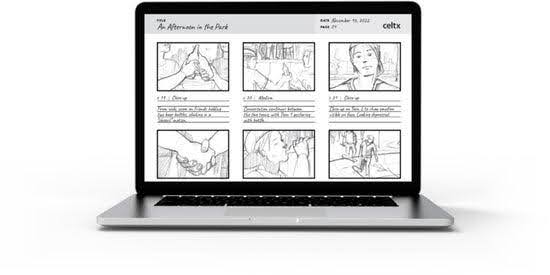
It wouldn’t be a Celtx blog if we didn’t tell you everything we can do to aid your production. Our all-in-one production platform offers scriptwriting, storyboarding, and shot listing tools in one place.
With Celtx, you can:
- Create shot lists with built-in templates
- Collaborate with team members in real-time
- Use storyboard panels and templates to visually plan your scenes
- Synchronize everything with your script and schedule
And it doesn’t end there! With Celtx you can also generate call sheets, schedule your shoot, plan your budget and so much more.
Celtx is becoming even more popular amongst both indie filmmakers and video producers looking for a budget-friendly and intuitive solution.
Storyboard That
Storyboard That is a web-based tool that makes storyboarding fast and easy, especially if you’re not a natural artist. It offers drag-and-drop characters, backgrounds, and props. You can even add text boxes for notes.
This tool is fantastic for quick visualizations and collaborative brainstorming within your production team.
StudioBinder
A favorite among professional film crews, StudioBinder offers powerful tools for creating shot lists, call sheets, shooting schedules, and more. Their interface is sleek and intuitive and is especially good for larger-scale productions that need a great deal of previsualizing.
ShotDeck
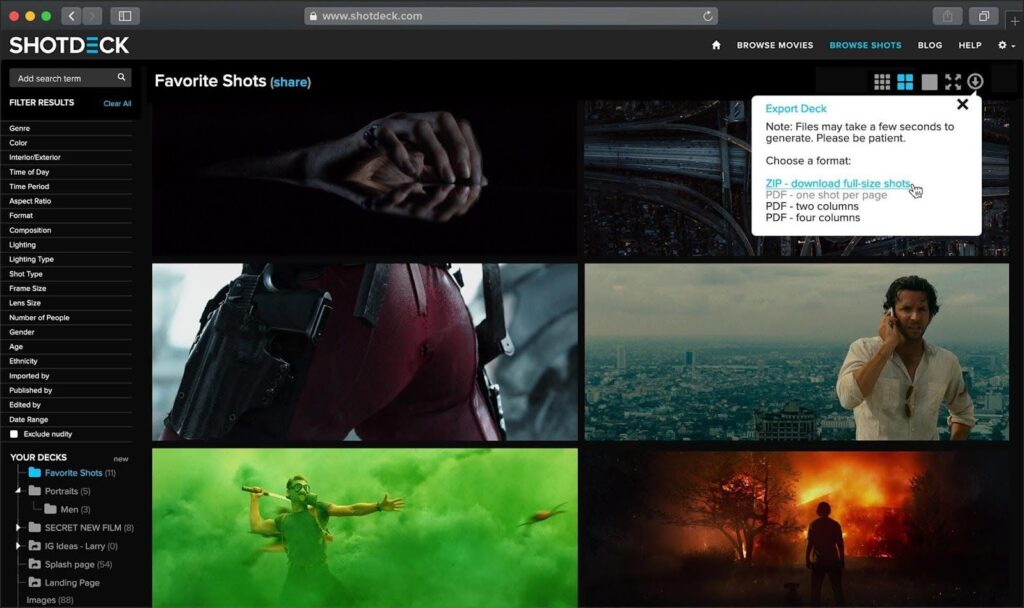
More of a visual inspiration tool but still very useful, ShotDeck lets you search thousands of high-quality film stills for reference. It’s great for mood boards and building storyboards with a polished look.
Canva and Google Docs
If you’re more of a DIY creative, Canva is a great way to build stylish storyboards using templates. Combine that with a Google Doc shot list and you’ve got a free, flexible solution that works well for small teams and solo creators.
Conclusion
Shot lists and storyboards are two sides of the same coin. One is visual and narrative; the other is technical and logistical. Together, they ensure your video project is well-planned, clearly communicated, and executed with precision.
Whether you’re producing a short film, a YouTube video, or a commercial campaign, don’t skip these steps. Use storyboards to map the story and convey the vision. Use shot lists to turn that vision into a shootable, trackable plan. And with tools like Celtx and StudioBinder, the process has never been easier or more collaborative.
So, the next time you dive into a video project, remember it’s not about choosing between a shot list or a storyboard but about using both to bring your story to life, exactly the way you imagined.
Up Next:
- How to Storyboard a Video: A Guide for Creators + Filmmakers
- AI Storyboarding Tools: What Creatives Need to Know in 2025
- The Top 10 Best Storyboarding Software in 2025