So, you’ve written your screenplay, what next? Perhaps you want to direct the film yourself and put together a stellar team for your production crew.
Before you dive into filming itself, there will be many working parts to organize. But the question is, how do you start mapping everything out? Things can easily get messy and tricky to keep track of. What you need is a shot list!
A shot list is a to-do list for filmmakers. Basically, it sets out everything that will happen in each scene of your movie. The director, cinematographer and other assistant directors may collaborate on putting the list together, a document that all members of the film crew can see, so they’re prepared and confident in the ongoing filmmaking process.
Table of Contents
- What is a Shot List and Why is it the Blueprint for Your Shoot?
- Why Use Celtx for Your Film Shot Lists?
- How to use Celtx to Build Your Shot List
- Shot List Best Practices for a Zero-Waste Shoot Day
- Common Shot List Pitfalls (and How to Avoid Them)
- Professional Shot List Examples: How the Masters Plan Their Vision
- Frequently Asked Questions (FAQ) About Shot Lists
- Conclusion: Protecting the Integrity of Your Visual Vision
What is a Shot List and Why is it the Blueprint for Your Shoot?
A shot list is a technical roadmap that translates your script into specific camera setups, framing, and movements. It serves as the ultimate blueprint for your crew, ensuring every necessary angle is captured to tell a coherent story while preventing costly reshoots or missing coverage in the edit suite.
What exactly goes into a shot list?
To keep your production moving efficiently, a professional list should include:
- Scene and Shot Numbers: For example, Scene 12, Shot A.
- Shot Type & Size: Defining the framing, such as a Close-Up (CU) or Wide Shot (WS).
- Camera Positioning: Technical details like angles (low/high) and movements (pan/dolly).
- Location Details: Specifying Interior (INT) vs. Exterior (EXT).
- Setup and Shoot Times: Estimates to help your 1st AD stay on schedule.
- Production Notes: Critical mentions for props, lighting, or specific audio needs.
Why this document is your production “safety net”
A professional shot list eliminates guesswork on set. By handling the logistics before you arrive, you free yourself to embrace the unexpected and truly “spread your creative wings” during the shoot.
This organization is also a lifesaver for your editor. In the post-production phase, the editor uses your shot list to identify exactly what coverage was intended for every moment of the film. It bridges the gap between your visual vision and the final cut.
But don’t worry—we aren’t going to leave you staring at a blank spreadsheet! In the next sections, we’ll walk through how to build and manage your own list using Celtx’s integrated tools. We’re more than just a pretty face—we’re here to make sure you never miss a shot.

Why Use Celtx for Your Film Shot Lists?
Digital shot listing saves hours of manual data entry and prevents expensive set delays. Celtx integrates your script, schedule, and budget into a single collaborative hub. This ensures your entire crew stays aligned in real-time, allowing you to focus on the creative vision rather than managing paperwork.
Real-Time Team Collaboration
Professional filmmaking relies on team synergy. Celtx provides cloud-based collaboration across every department, from the director to the wardrobe team. Your crew can review plans and contribute updates instantly from anywhere in the world. This eliminates the confusion of distributing different versions of your list and ensures everyone has the most current information.
Smart, Customizable Templates
You don’t need to build your production roadmap from scratch. Our customizable templates allow you to skip the manual setup and focus on your story. We speed up the process by pre-loading industry-standard technical specifications, including:
- Shot Types & Sizes
- Camera Angles
- Lens Choices
- Equipment Specs
Because the platform is fully integrated, these templates automatically draw scene numbers, locations, and cast details directly from your screenplay.
Seamless Integration with Your Workflow
You can start building your production blueprint during your very first draft. As you write, you can tag scenes and visual references to build your shot list and storyboard simultaneously. This integrated approach allows you to manage the big picture creatively and logistically.
Furthermore, your shot list links directly to your production schedule. This ensures your shooting order always aligns with actor availability and location windows. You can even track costs in real-time within the software to ensure you are sticking to your film budget as you go.
How to use Celtx to Build Your Shot List
Creating a digital shot list in Celtx transforms your creative vision into a technical plan in minutes. By using our integrated toolbar, you can link specific camera setups directly to your screenplay scenes. This ensures your technical specifications—like shot size, movement, and estimated runtime—are always synced with your latest draft.
Step 1: Access the Production Toolbar
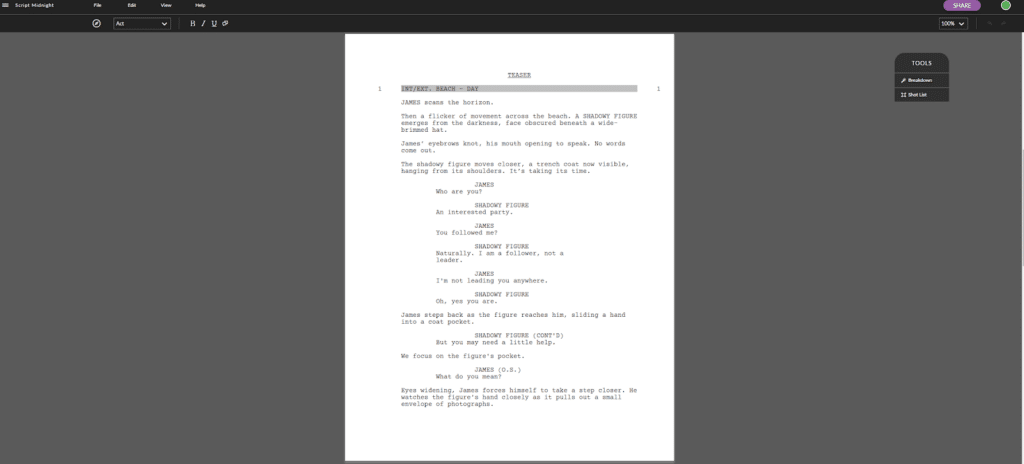
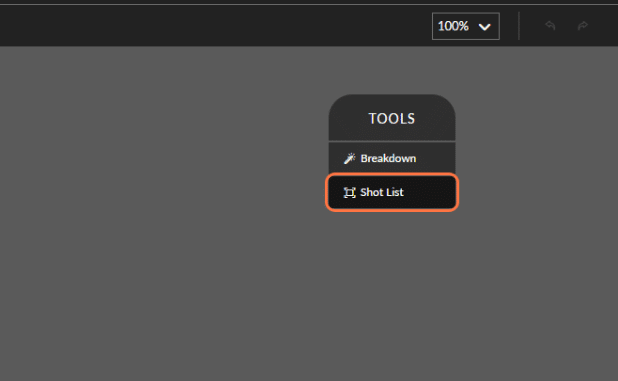
Open your project and look to the right-hand side of your screenplay editor. You will find the vertical toolbar. Locate and click the “Shot List” icon to open your production dashboard.
Step 2: Initialize Your First Setup
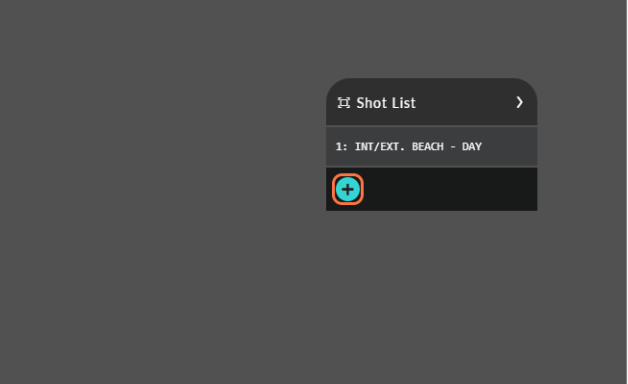
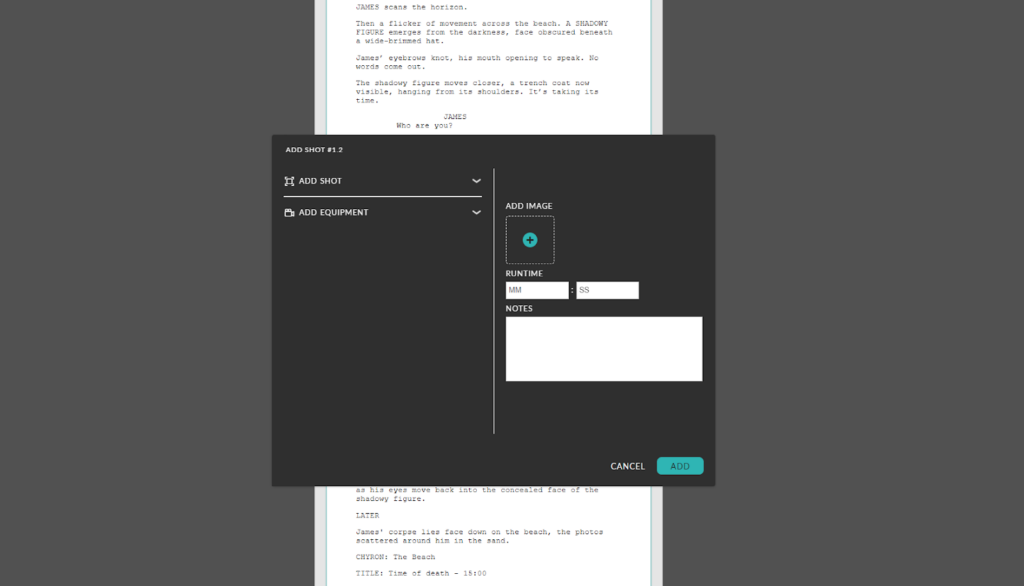
Once the menu appears, click the blue “+” button. This action opens the primary shot window, where you will define the technical “DNA” of your visual setup.
Step 3: Define Your Technical Specifications
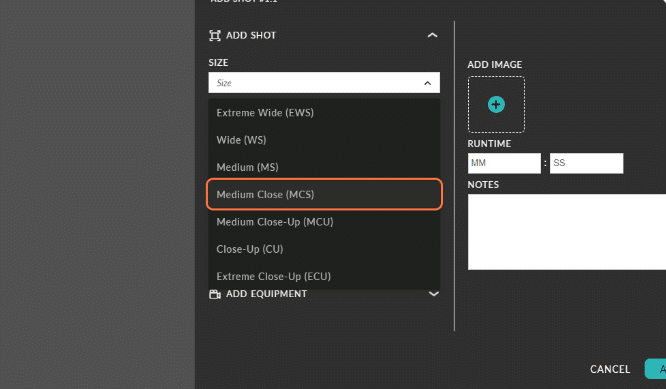
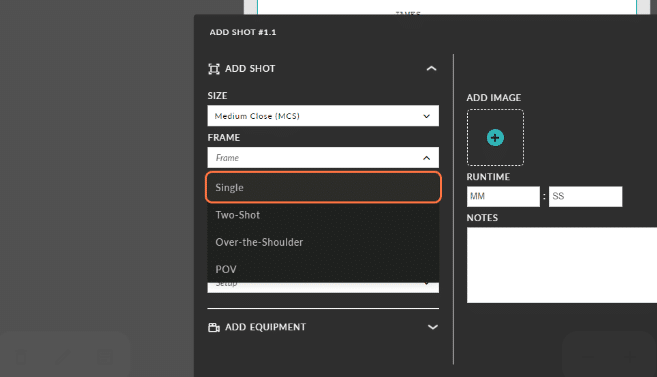
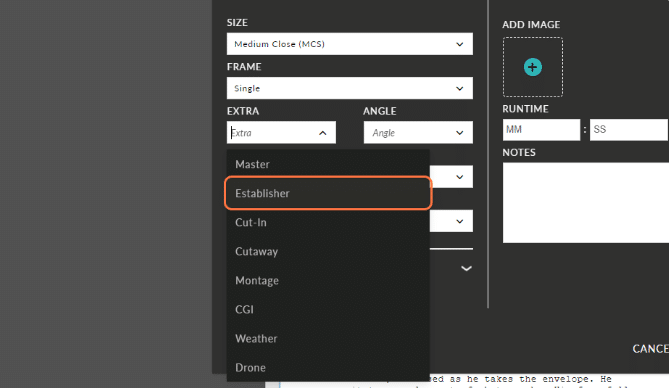
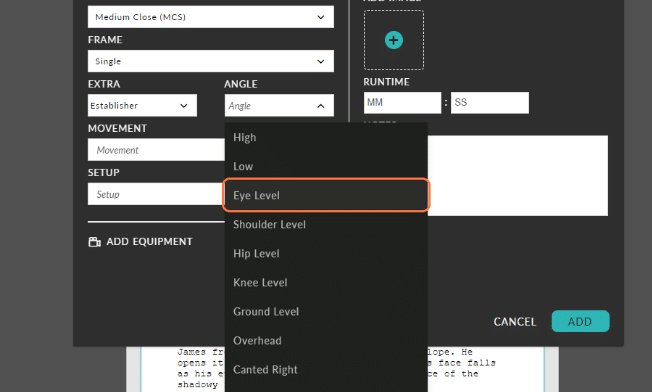
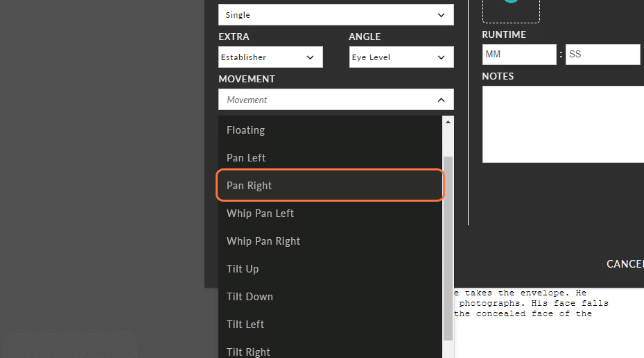
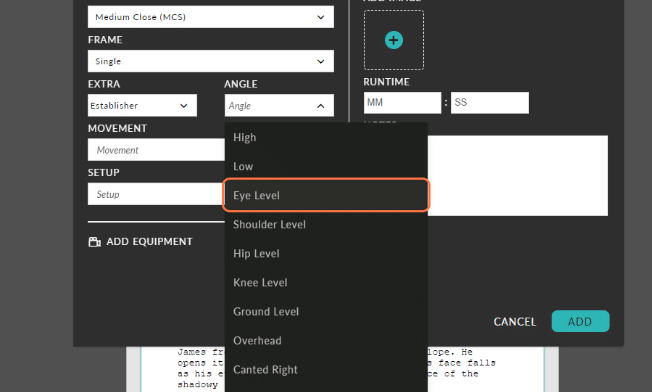
Now, select your shot size, frame, angle, and movement. For example, if you are opening your movie with a wide shot of a beach, you would select “Establishing Shot” or “Wide” from the pre-loaded technical menu. Be specific here so your camera crew understands the exact framing you require.
Step 4: Add Visual Reference Images
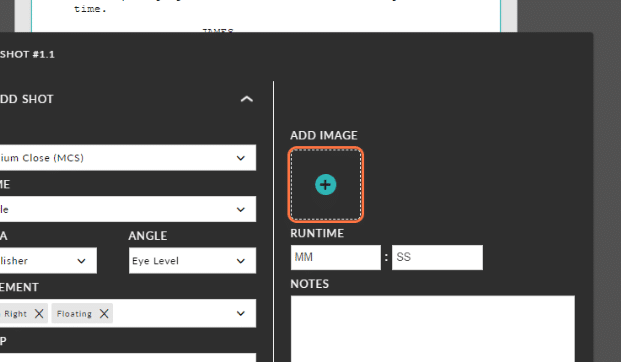
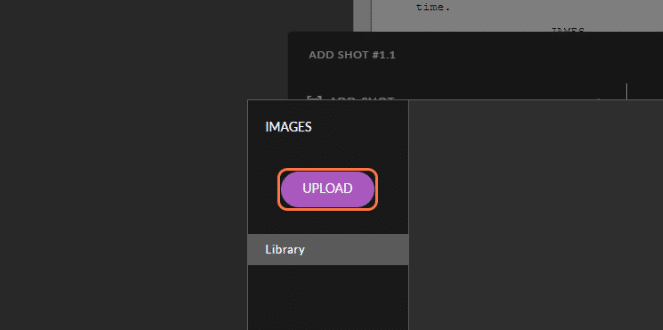
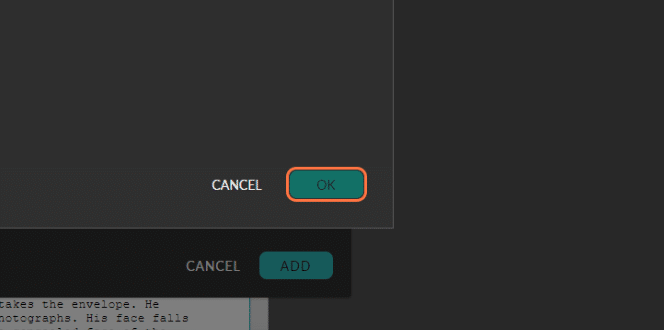
Adding reference images is the best way to share your vision with your crew. If you have already secured your location or have specific storyboards, click the blue “+” symbol under “Add Image.” You can upload new files or select existing images from your Celtx library. Make sure your chosen image is highlighted with a tick, then click “Ok.”
Step 5: Estimate Your Shot Runtime
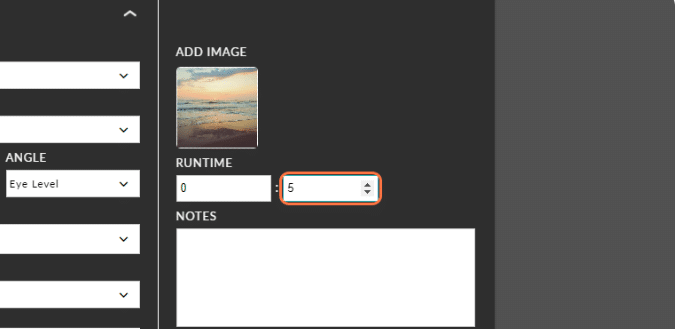
Estimating the duration of a shot is vital for accurate scheduling. In the runtime section, enter the number of seconds you expect the shot to last. For instance, if you want the camera to linger on an establishing shot to evoke an “eerie” mood, you might set the runtime to five seconds. This data helps your 1st AD determine how long a scene will take to film.
Step 6: Sync Cast, Props, and Final Details
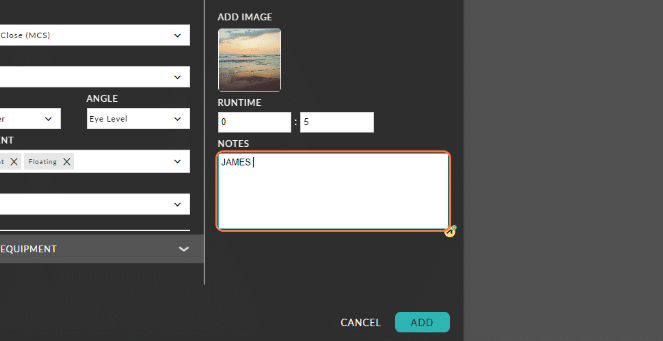
Finally, add the “Actionable Data” your production team needs. Use the detail fields to list the cast members involved, specific props required, or miscellaneous notes regarding lighting or audio. Once you have recorded all necessary information, click “Add.”
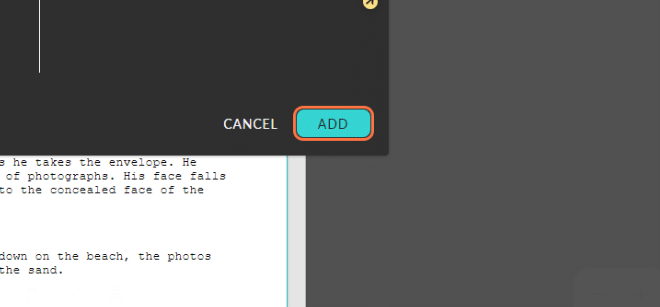
When I return to the screenplay itself, I can see the updated shot list on the right-hand side of the screen, with my first shot added.
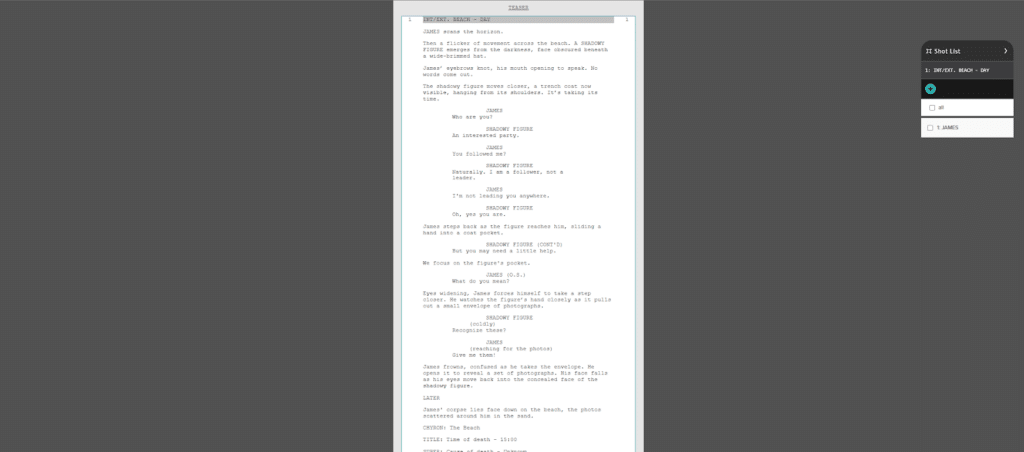
Step 7: Finalize and Review Your Complete List
When you return to your screenplay, your new shot will appear in the list on the right side of the screen. Continue this process for every setup until your production blueprint is complete. You now have a searchable, digital roadmap for your entire shoot.
If you need to see a walk-through of the step-by-step, see our support article or the YouTube tutorial below:
Shot List Best Practices for a Zero-Waste Shoot Day
While filmmaking is deeply personal, the shoot day is a logistical marathon. A professional shot list is your primary tool for protecting your budget and your sanity.
By following these industry-standard best practices, you ensure that every minute on set is spent capturing your vision rather than managing confusion.
1. Group Shots by Setup Complexity
The most common mistake beginners make is shooting in script order. Instead, group your shots by camera setup and lighting rig. If Scene 1 and Scene 4 both use the same lighting setup at the same kitchen table, shoot them back-to-back. This minimizes equipment moves and maximizes your shooting window.
2. Use Standard Technical Shorthand
To keep your crew aligned, use clear, consistent terminology. Don’t just write “Close Up”; specify the shot type (e.g., MCU for Medium Close-Up or ECU for Extreme Close-Up).
Include specific camera angles and movements like Dolly, Pan, or Tilt so your DP (Director of Photography) knows exactly which equipment needs to be rigged for that setup.
3. Differentiate Priority vs. “Bonus” Shots
Time is the most expensive resource on a film set. Label your shots as either “Essential” (shots you absolutely need to assemble the scene) or “Stretch Goals” (experimental or extra coverage you’ll take only if you are ahead of schedule). This allows you to make fast, confident decisions when you are losing light or running behind.
4. Factor in “The Buffer”
When estimating setup times, use this professional formula: Setup Time + Action Time + 10% Safety Buffer = Total Shot Duration. A 10-second dialogue shot might only take 10 seconds to film, but it could take 30 minutes to light and block. Recording these estimates helps your 1st AD keep the entire production on track.
5. Include Continuity and Audio “Flags”
Note any high-stakes elements that require extra prep time. This includes specific action (like gunfire or stunts), green screen requirements, or audio-heavy dialogue cues. By “flagging” these in your shot list, you give your sound, wardrobe, and safety teams ample time to prepare, preventing a bottleneck in your production flow.
Common Shot List Pitfalls (and How to Avoid Them)
A shot list should reduce stress, but an overly complex or rigid list can actually cause production delays. Successful filmmakers avoid common pitfalls—like over-scheduling or ignoring technical logistics—to ensure their crew remains focused on the creative vision rather than racing against the clock.
1. Overloading the Scene
It is tempting to include every possible angle, but over-scheduling leads to exhausted crews and “thin” coverage. Prioritize your essential shots first. Aim for quality over quantity to ensure you capture the heart of the scene before your time or budget runs out.
2. A Lack of Creative Flexibility
Remember that a shot list is a roadmap, not a prison. If you stick too rigidly to your notes, you leave no room for the “happy accidents” that happen during actor blocking. Stay open to new angles that emerge on set—these spontaneous changes often result in your best footage.
3. Running a One-Person Show
Filmmaking is the ultimate collaborative medium. Failing to coordinate your list with your Director of Photography (DP) or 1st AD is a major risk. Share your digital shot list ahead of time so your department heads understand the technical requirements and can flag potential equipment needs.
4. Overlooking Scene Transitions
While it’s easy to focus on the “hero” dialogue, it is just as easy to miss the connective tissue. Make sure to include cutaways and transition shots in your list. These help the editor maintain narrative flow and prevent jarring jumps in the final cut.
5. Underestimating the Ticking Clock
A common mistake is failing to allocate enough time for complex setups. Lens swaps, lighting adjustments, and gear moves often take longer than the actual filming. Factor in a safety buffer for every setup to avoid a chaotic rush at the end of the day.
6. Ignoring Continuity Logistics
Continuity errors are “immersion killers.” While human error is natural, you can prevent most mistakes by including specific continuity notes in your shot list. Ensure your script supervisor is aware of any prop-heavy shots or complex movements that require extra tracking.
Professional Shot List Examples: How the Masters Plan Their Vision
Seeing a shot list in action is the fastest way to understand its power. Whether it’s a legendary Hollywood blockbuster or a modern indie series, the goal remains the same: translating abstract emotion into technical camera instructions. By studying how professionals like Alfred Hitchcock and Martin Scorsese plan their coverage, you can learn to use “visual grammar” to tell a deeper story.
1. The “Hitchcock Rule” for Close-Ups
Alfred Hitchcock was a master of “camera logic.” He famously utilized what is now known as the Hitchcock Rule: the size of an object in your frame should be directly proportional to its importance to the story at that moment.
When you look at a Hitchcock shot list, you’ll see a heavy emphasis on montage—breaking an action into a series of specific close-ups. In the famous shower scene in Psycho, Hitchcock used 70 different camera setups for just 45 seconds of footage. He didn’t just film a scene; he “played the audience like an orchestra” by controlling exactly what they saw and when.

2. The Scorsese Philosophy: Motivation and Movement
Martin Scorsese takes the shot listing process so seriously that he often draws them himself by hand. To him, every setup must have a philosophy. He asks: “Should this be a moving shot at all? If it’s static, what size is the character in the frame?”
In films like Goodfellas or Killers of the Flower Moon, Scorsese uses camera movement to mimic a character’s emotional reaction. If a character is hit with a sudden realization, the camera might “dolly-in” rapidly to mirror their shock. This proves that a great shot list isn’t just about “coverage”—it’s about emotional intent.
3. Modern Indie Perspectives: Andy Rydzewski (PEN15)
Don’t just take our word for it—modern pros rely on these blueprints every day to survive high-speed sets. Cinematographer Andy Rydzewski (Hulu’s PEN15) explains that a shot list is a tool for finding the “beauty” in a scene’s intention. Whether shooting loneliness or madness, the list ensures the technical specs match the mood.
4. High-Detail Technical Execution
For a look at the level of detail a professional list requires, look no further than German filmmaker Hans-Joachim Brucherseifer. His examples showcase how to integrate scene numbers, shot descriptions, and equipment requirements into a single, searchable document.
Frequently Asked Questions (FAQ) About Shot Lists
While a storyboard provides a broad visual outline through sketches, a shot list is a more granular, technical document. A storyboard shows the sequence of a scene, but a shot list specifies the exact camera angles, framing, equipment requirements, and estimated runtimes for every individual setup.
Read more: Storyboard vs Shot List? Actually, You Need Both
The script must always come first. Because the shot list is a technical roadmap for bringing a story to life, you cannot determine which shots are necessary until the screenplay is finalized and the narrative intent of each scene is fully understood.
The shot list is typically a collaborative effort between the director and the cinematographer (DP) during pre-production. In a professional setting, the 1st Assistant Director (1st AD) also reviews the list to estimate setup times and ensure the plan fits within the daily production schedule.
Yes, a shot list is a living document and is not set in stone. While you should always aim to follow your plan, being prepared allows you to make confident adjustments or embrace spontaneous creative opportunities without causing confusion among your crew.
Without a shot list, a production risks missing critical angles that are impossible to fix in post-production, leading to expensive reshoots. It saves significant time on set by ensuring the crew always knows which setup to prepare next, which keeps the budget under control and the creative vision intact.
Conclusion: Protecting the Integrity of Your Visual Vision
Shot lists are the technical backbone of every successful shoot day. They ensure a smooth, organized, and collaborative workflow for your entire crew. By planning each setup in meticulous detail, you free your mind to focus on the art of storytelling. An effective list enhances communication across every department. It also helps you avoid common production pitfalls like continuity errors or “lost shoot days.”
Whether you are a seasoned filmmaker or a first-time director, mastering your shot list will save you significant time and effort on set. It gives you the professional freedom to bring your vision to life without the logistical stress.
Celtx offers the ultimate all-in-one solution for this technical journey. Our integrated tools allow you to create organized plans directly alongside your screenplays. With customizable templates and real-time collaboration, we help you streamline your entire production lifecycle from the first setup to the final wrap.
Ready to enhance your filmmaking workflow?
Explore the Celtx platform and start building your shot list today!
Up Next:

How to Create a Shooting Schedule: The Essential Guide
You have your shots—now you need to know when to take them. Learn how to translate your visual roadmap into an efficient shooting schedule that respects your crew’s time and your project’s budget.