At some point, every screenwriter runs into the same modern problem: Your characters need to text each other.
Maybe it’s a late-night “u up?” message. Maybe it’s a devastating breakup sent in three brutal words. Maybe it’s the clue that cracks your mystery wide open. Whatever the case, one question inevitably follows: How do you format text messages in a screenplay without making the script look like a Microsoft Word accident?
The short answer is that there’s no single “official” rule. The longer answer is that there are several widely accepted ways to format text messages, and the best choice depends on how important the message is, how cinematic you want it to feel, and how easy you want the script to be to read.
In today’s blog, we’ll walk through the most effective ways to format text messages in a screenplay, when to use each method, and the mistakes that instantly make scripts feel amateurish.
So, let’s get going…
Table of Contents
- Text Messages? In a Screenplay?
- Why Text Messages Are Tricky in Screenplays
- 3 Ways to Format Text Messages in Your Script
- When to Show Text on Screen vs Dialogue
- Common Mistakes Made with Text Message Formatting
- Example Scenes of Text Messages in Scripts
- How Screenwriting Software Handles Texts
- FAQ About Formatting Text Messages
- Conclusion

Text Messages? In a Screenplay?
Twenty years ago, screenwriters rarely had to worry about text messages.
Characters made phone calls. They left voicemails. They showed up at each other’s doors dramatically in the rain.
Today, entire relationships unfold through iMessage bubbles.
People flirt, argue, ghost, confess, and break up without ever speaking aloud. If your screenplay is set in the modern world, text messages are almost unavoidable. And that creates a unique challenge.
Unlike dialogue, texts are silent, visual, often brief, and sometimes simultaneous. They can be either shown to the audience or sometimes hidden. As a writer, you need to convey all of that without slowing down the script or confusing the reader.
Why Text Messages Are Tricky in Screenplays
Text messages sit in an awkward middle ground. They’re not quite dialogue, because no one is speaking aloud. They’re not exactly action, because they often contain crucial story information. And they’re not standard inserts, because they can become part of the emotional rhythm of a scene.
If formatted poorly, text messages can:
- Interrupt pacing
- Confuse readers about who is sending what
- Overcrowd the page
- Draw attention to formatting instead of story
But, if formatted well, they can:
- Reveal character
- Deliver exposition efficiently
- Build suspense
- Add humour
- Break hearts with frightening efficiency
If you’ve ever received a “We need to talk,” you know exactly what I mean.
3 Ways to Format Text Messages in Your Script
There are three common approaches used by professional screenwriters. Each one works, but the best option depends on how prominently the message appears in the scene.
1. Action Description

This method is clean, quick, and universally understood. It’s usually best for:
- Minor messages
- Everyday communication
- Scripts where the exact visual presentation isn’t important
Pros:
- Extremely readable
- Minimal formatting fuss
- Works in all screenwriting software
Cons:
- Less cinematic
- Doesn’t emphasise the message as strongly
Think of this as the “don’t overcomplicate it” option.
2. Insert Phone Screen

This tells the reader that the audience sees the actual screen. It’s good for:
- Important revelations
- Mystery clues
- Threatening messages
- Plot twists
Pros:
- Highly visual
- Draws attention to the message
- Feels cinematic
However, it can become repetitive if overused.
My advice is to use inserts sparingly. Like slow motion or voice-over, they lose impact when every other scene contains one.
3. Dialogue Formatting
Some writers format text messages almost like regular dialogue.

Or:

This approach treats the message as a spoken line, even though it isn’t spoken aloud. Use it when you want to show:
- Extended text exchanges
- Fast-paced back-and-forth conversations
- Rom-com banter
Pros:
- Familiar and easy to follow
- Great for longer exchanges
- Keeps messages prominent
But this style can blur the line between spoken and silent communication. If you use this method, label it clearly with “(TEXT)” so nobody mistakes it for dialogue being spoken aloud.
When to Show Text on Screen vs Dialogue
Here’s the most important question: “Does the audience need to see the exact wording?” If yes, show the text. If no, summarise it in action.
For example:

This works perfectly if the specific wording isn’t important. But if the message changes the story, you may want to consider something like this:

A useful rule of thumb is that if changing one word would alter the emotional impact, show the text directly.
Format scenes like this faster with Celtx’s built-in tools. Try it for free today!

Common Mistakes Made with Text Message Formatting
Even experienced writers occasionally turn text messages into formatting chaos. Here are the biggest offenders:
1. Over-Formatting
If your script starts looking like a graphic design project, you’ve gone too far. Remember, the screenplay is a blueprint, not the final visual treatment. You don’t need emojis, fake text bubbles or elaborate indentation experiments. Remember, keep it simple.
2. Inconsistent Style
Switching between three different methods in the same script is disorienting. Choose one primary approach and stick with it unless there’s a compelling reason to change. Readers love consistency almost as much as they love scripts that aren’t 148 pages long.
3. Unclear Sender
If the audience doesn’t know who sent the message, the moment loses impact. Always identify the sender unless mystery is intentional.
Don’t do this:

Instead, do this:

4. Showing Every Single Text
Most real-life texting is profoundly uncinematic.
“On my way.”
“K.”
“Need milk?”
Only include text messages that advance character, plot, or tension. Nobody needs to read twelve pages of scheduling logistics unless your screenplay is a thriller about Google Calendar.
Example Scenes of Text Messages in Scripts
Sometimes the easiest way to understand text message formatting is to see it in action.
Below are three fully formatted examples, each using a different approach. More importantly, I’ll explain why each format works and when you’d want to use it in your own script.
Example 1 | Simple Text in Action

This is the cleanest and most straightforward way to include a text message.
The message is embedded directly into the action lines, so the reader absorbs it as part of the scene rather than stopping for a special formatting device. It takes up very little space and keeps the page moving.
The wording of the text is still important as it creates immediate tension, but it doesn’t require a dramatic close-up of the phone screen. The emphasis is on Maya’s reaction, not the visual presentation of the message itself.
This approach is ideal when:
- The text is brief.
- The message is easy to understand at a glance.
- The visual appearance of the phone isn’t important.
- You want to maintain fast pacing.
This is the format many professional writers default to because it’s simple, elegant, and universally understood.
Script readers process hundreds of pages a week. They appreciate formatting that communicates information quickly and clearly. This method feels effortless to read, which means they stay immersed in the story rather than noticing your formatting choices.
Example 2 | Text Shown on Screen

This format deliberately draws attention to the text message by presenting it as a visual insert. The reader understands that the audience will see the exact words on screen, just as Lucy sees them. That makes the message itself the dramatic event.
In this example, the threat is the key moment. The specific wording carries the tension, so isolating it on the page gives it extra weight.
Use an insert when:
- The precise wording is crucial.
- The message delivers a major reveal.
- The text functions as a clue, threat, or turning point.
- You want the audience to focus entirely on the message.
This technique is especially common in thrillers, mysteries, and horror, where a single text can dramatically shift the story.
The insert creates a pause and highlights the information without overwhelming the page. It tells the reader, “Pay attention, this message is important.” Because of that, inserts are highly effective, but they should be used selectively so they retain their impact.
Example 3 | Text Conversation
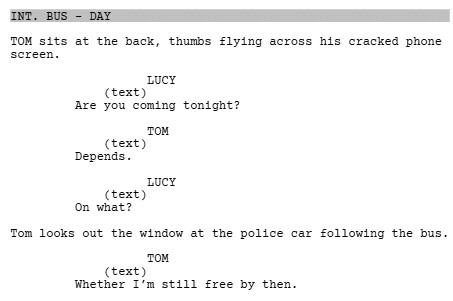
This example treats text messages almost like dialogue, which makes the exchange feel fast, dynamic, and conversational.
Because the characters are sending multiple messages back and forth, traditional action formatting would become repetitive. Dialogue formatting keeps the scene flowing and allows the text exchange to carry dramatic rhythm.
The beat where Tom notices the police car also shows how you can intercut action with text messages to build suspense. This approach is best when:
- Two or more characters are texting back and forth.
- The exchange lasts several messages.
- The rhythm of the conversation is important.
- The texting functions similarly to spoken dialogue.
This is particularly effective in romantic comedies, dramas, and thrillers where text conversations reveal subtext or tension.
Dialogue is naturally easy to scan. By using a familiar format, the reader can follow the conversation quickly and focus on what the messages mean emotionally. It also prevents the scene from becoming cluttered with repeated “A text from…” action lines.
How Screenwriting Software Handles Texts
Most screenwriting software won’t have a dedicated “text message” format, so don’t panic if you can’t find one. In Final Draft, you can usually format texts using Action, Dialogue, or Shot/Insert elements.
In Celtx, WriterDuet, Fade In, Highland, and Arc Studio, the same basic principle applies: choose the element that makes the moment clearest.
You do not need a special template; you just need consistency.
A good approach is:
- Use Action for quick texts.
- Use Insert when the audience needs to see the phone screen.
- Use Dialogue-style formatting for longer exchanges.
The software is there to support the read, not make the decision for you.
FAQ About Formatting Text Messages
No. Use it only when the text is meant to appear visually to the audience. If a character simply reads a message, action description is enough.
Usually, no. Quotation marks can make texts look like spoken dialogue.
Only if the emoji is genuinely important to the story. Otherwise, avoid them. They can look messy on the page and may not translate clearly in production.
Not usually. You can capitalize labels like TEXT FROM MUM or INSERT – PHONE SCREEN, but the message itself should read naturally.
That’s fine if mystery is intentional. Just make sure the confusion is dramatic, not accidental.
Conclusion
There is no single perfect way to format text messages in a screenplay. The best format is the one that makes the moment clear, readable, and cinematic.
For quick messages, use action, and for important visual reveals, use an insert. For longer exchanges, use dialogue-style formatting with a clear “TEXT” label. Above all, keep it consistent.
Text messages may be tiny on a phone screen, but in a screenplay, they can carry huge dramatic weight. The trick is making sure the reader understands them instantly without stopping to decode your formatting.
Start writing your script with industry-standard formatting in Celtx.
We’ll make formatting text messages and phone calls easy.
Up Next:

How to Format Phone Calls in a Screenplay: The 2026 Definitive Guide (+FREE Template)
You’ve mastered the text; now handle the call. Learn the professional rules for formatting phone scenes using INTERCUT and V.O. to keep your narrative pacing tight and your script production-ready.