A screenplay is the foundation of every film or TV show, from character development to plot, setting, and dialogue. It’s the blueprint that brings stories to life. But with so much information to convey, clarity is key.
One way screenwriters achieve this is by using sluglines—short, impactful lines that define the scene’s location and time of day.
In this article, we’ll break down what a slugline is, how to write one, and how they help orient readers through your screenplay.
Table of Contents
- What is a Slugline and Why Does Your Script Need Them?
- The 3 Core Components: The Anatomy of a Professional Slugline
- Slugline vs. Scene Heading: Is There a Difference?
- Using Subheadings and “Mini-Slugs” to Master Pacing
- Professional Slugline Examples from Award-Winning Scripts
- The Professional Playbook: Best Practices for Clean Sluglines
- 5 Common Slugline Mistakes Readers Hate
- Sluglines & Screenwriting Software
- Frequently Asked Questions (FAQ) About Sluglines
- Conclusion
What is a Slugline and Why Does Your Script Need Them?
A slugline (also called a scene heading) is the first line of every new scene in a screenplay. It provides the essential “metadata” that tells the director, crew, and reader exactly where and when the action takes place. Its primary purpose is to orient the reader in time and space, ensuring narrative clarity and professional production logistics.
The “Price Tag” Fact: Every new master slugline you write signals a “Company Move.” In production, this means the entire crew must pack up equipment and move to a new location. As the number of locations increases, so does the film’s budget. Pro writers use sluglines strategically to balance creative vision with production reality.
The 3 Core Components: The Anatomy of a Professional Slugline
A standard master slugline follows a rigid, three-part anatomy to remain readable for both humans and production software:
- Interior vs. Exterior (INT. vs. EXT.): Start with the designation to show if the scene is indoors or outdoors. Use INT/EXT. for transitional scenes, such as a character in a moving vehicle.
- Specific Location: Clearly specify the place, followed by a period (e.g., INT. DOCTOR’S SURGERY.). Avoid flowery details here; keep descriptors brief.
- Time of Day: End with a dash followed by a standard time marker like DAY or NIGHT. Use specific markers like DAWN or DUSK only if the lighting is critical to the story.
Slugline vs. Scene Heading: Is There a Difference?
While these terms are used interchangeably, they have distinct origins. “Slugline” is the industry nickname, while “Scene Heading” is the technical term found in professional software like Celtx.
The Journalism Connection: In newsrooms, a “slug” is an internal identifier used to track an article through the editorial process (e.g., “CityBudget2024”). It is never published. Screenwriters appropriated this term because, like a newspaper slug, a script heading identifies the “item” for the crew. The term originally comes from 19th-century printing, where Linotype machines cast a solid line of lead known as a “slug.”
Start writing your Script with Celtx today. Click here to start your free trial!
Using Subheadings and “Mini-Slugs” to Master Pacing
Subheadings are truncated lines used for small changes within a master location. They help maintain a “fast read” and create essential “white space” on the page.
Handling Location and Visual Changes
Each subheading should be on its own line in all caps. For example, if characters move from a reception desk to a waiting room within a doctor’s office, use a simple subheading like WAITING AREA instead of a full master slug.
Formatting Insert Shots
Insert shots focus on a small, significant detail like a letter or a ringing phone. Use INSERT – HANDWRITTEN LETTER to draw the audience’s eye exactly where it needs to be without interrupting the scene’s flow.
Transitioning Time
Use subheadings to indicate jumps in chronology without changing location. Indicators like LATER or FLASHBACK help the reader follow the narrative timeline without needing redundant location data.
Professional Slugline Examples from Award-Winning Scripts
Knives Out (Master Slugs)
Rian Johnson uses clean master sluglines to ground the audience in the Thrombey Estate before moving to specific rooms. All environmental details are reserved for the action lines.


Here we have a slightly more specific location in terms of the bedroom. But, again, that’s all the information we’re given. This is the point of sluglines, as they give concise and simple information that can be used by the director and the rest of the film crew to determine exact scene locations.
American Hustle (Sub-slugs)
Let’s take a different example, 2013’s American Hustle.
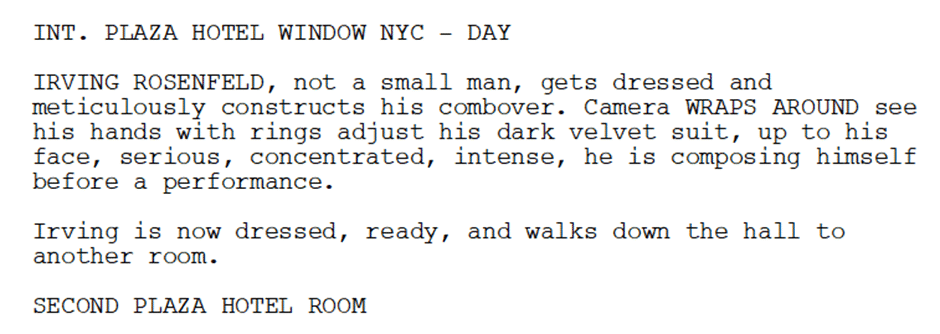
Use subheaders when characters move between rooms in a single sequence to keep the pace snappy and professional.
Toy Story 3 (Visual Perspective)
Take this example from Toy Story 3 (2010). We find ourselves in Andy’s yard, viewing Woody darting from a tree to a boulder.
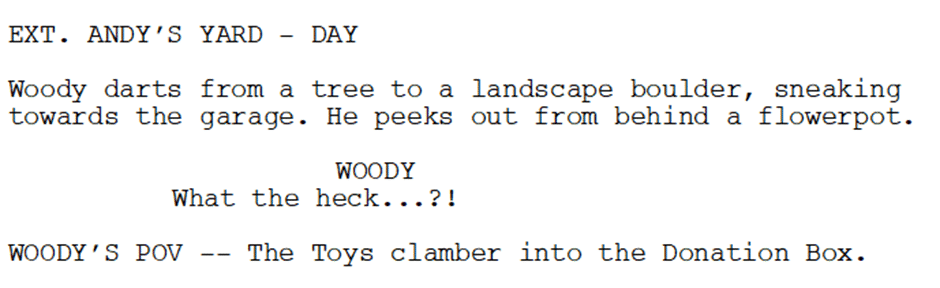
Subheadings can indicate a shift to a character’s P.O.V., signaling a change in tone or action without a location move.
The Professional Playbook: Best Practices for Clean Sluglines
To ensure your script remains readable and production-friendly, follow these industry-standard best practices:
Always Use Master Slugs for New Scenes
Every new scene must start with a full master slugline to establish location and time.
Keep it Concise
Avoid flowery prose in your headings. Use “EXT. HIGHWAY – NIGHT” rather than describing the moonlight.
Prioritize Standard Time Formats
Stick to DAY or NIGHT whenever possible. This helps production teams manage lighting and scheduling efficiently.
Stay Consistent
If you name a location “POLICE STATION” on page 1, do not change it to “PRECINCT” on page 50.
Use Subheadings for Fluidity
Use mini-slugs for character movements between rooms to improve the script’s pace.
5 Common Slugline Mistakes Professional Readers Hate
One thing you don’t want to do is turn readers away from your screenplay before they ever really dig into it. Here are 5 common mistakes we often see:
- Over-Detailing: Writing “INT. LARGE, DIMLY LIT OFFICE WITH STACKS OF PAPER” is a rookie error. Keep it to “INT. OFFICE – NIGHT” and move the mood to your action lines.
- Missing Periods: Forgetting the period after INT. or EXT. abbreviations.
- Overusing Transitions: You don’t need “CUT TO:” before every new slugline. The slugline itself implies a cut.
- Inconsistent Naming: Using different names for the same location, which confuses the crew.
- Omitting the Time of Day: Leaving the reader to guess if the scene takes place in light or darkness.
Sluglines and Screenwriting Software
Screenwriting software makes formatting easier than ever, ensuring your sluglines follow industry standards automatically. Celtx, for example, streamlines the process with intuitive keyflow—just press Tab or Enter to switch between scene headings, action, dialogue, and more.
No need to worry about manual formatting; Celtx helps you focus on writing while keeping your script professional and polished.
No matter which software you use, it’s always a good idea to double check all your formatting. The film industry is the busiest it’s ever been, with thousands of scripts in circulation. A small formatting mistake could mean the difference between a script that gets read and one that gets overlooked.
Let Celtx handle the formatting. Create a free Celtx account.
FAQ: Frequently Asked Questions About Sluglines
While many modern writers prefer bold sluglines to make scenes stand out, it is a personal preference. If you choose to bold, you must be consistent throughout the entire script.
Avoid being this specific unless there is a clock visible on screen. Stick to standard markers like DAY or NIGHT to assist with production scheduling.
Professional writers rarely use “ESTABLISHING” in the slugline. If you need to establish a place, simply describe the wide exterior in the action line following the slug.
Use CONTINUOUS only when a scene flows from the previous one with zero time gap, such as a character moving from an office into a hallway.
Capitalization visually separates scene breaks from action and dialogue. This makes the script scannable for the crew during a busy shoot day.
Conclusion
Sluglines are more than just formatting; they shape the rhythm and readability of your script.
By keeping them clear, concise, and consistent, you ensure your project makes a professional first impression.
Ready to take the next step in your screenwriting journey?
Try Celtx to unlock seamless script formatting!
Up Next:

Action Lines: The Do’s and Don’ts to Make Your Script Move
Now that you’ve oriented your reader in time and space with a perfect slugline, it’s time to fill the frame. Learn how to write lean, visual action lines that translate directly to the screen