If you’re a screenwriter working with limited resources (and, realistically, most of us have written entire stories fuelled primarily by instant coffee and sheer stubbornness), Celtx is one of the first names you encounter.
It’s cloud‑based, industry‑friendly, beginner‑friendly, and offers something precious: a genuinely usable free plan for everyone from veteran indie filmmakers to beginner writers.
But what does “free” actually mean here? Can you write a feature without bumping into restrictions? Can you collaborate with a writing partner? At what point do you need to upgrade?
In today’s blog, we’ll explore everything you can and can’t do on Celtx Free so you know exactly how far it can carry your script before you need anything more. We know you’ll absolutely love it!
Table of Contents
- The Celtx Free Plan
- What is Included in the Celtx Free Plan?
- The Celtx Free Project Limit: Why Focus Leads to Better Scripts
- More Than a Document: Exploring the Anatomy of a Celtx Project
- Professional Collaboration: How to Co-Write for Free in Celtx
- Celtx Free vs. Paid: When Your Production Outgrows the Sandbox
- Step-by-Step: Getting the Most Out of Your Free Project Today
- FAQs About the Celtx Free Plan
- Conclusion
The Celtx Free Plan
Across its lifespan, Celtx has shifted from a downloadable desktop app to a streamlined cloud platform that focuses heavily on providing writers with a clear, distraction‑free space.
The free plan reflects that philosophy and is built around the idea that early drafts should feel simple and focused. Rather than overwhelming you with production tools before you need them, Celtx Free gives you a clean space to write, revise, and organize your ideas.
What you get is fully functional with no time limits and no “you must upgrade to format this line as a slug.” You get a professional screenwriting editor with cloud storage and collaboration.
That said, Celtx keeps a few limitations in place to encourage the kind of focus many writers actually benefit from. The free plan doesn’t attempt to replace a full production suite and isn’t designed to juggle a slate of five features and a pilot. But for developing one project at a time, the free version is a surprisingly powerful tool.
What is Included in the Celtx Free Plan?
Here’s what you get at no cost:
One Active Project
This is the big one (and we’ll talk about it next). But yes: you get one story project in your workspace at a time.
Full Use of Celtx’s Script Editor
No watermarks, restrictions, page limits, or missing features.
You can write:
- Screenplays
- Teleplays
- Stageplays
- Audio dramas
- AV scripts (for things like commercials)
All professionally formatted, all saved to the cloud, and all accessible from any browser.
Outlining and Story Development Tools
These are genuinely impressive for a free plan:
- Beat sheets (limited access but still super useful!)
- Index cards
- Scene organization
- Simple story structure tools
It’s basically a writer’s room in miniature.
Real-Time Collaboration
While you can easily co-write for free and without sharing passwords or doing something dodgy like syncing a Word doc via email.
With Celtx you can invite collaborators, edit together, comment, and mark up the script.
Revision and Editing Tools
Track changes? Yep. Comments? Yep. Editable formatting? Absolutely. Revision history? That too. Celtx has it all to ensure each and every draft of your script gets the attention it deserves.
PDF Exports
You can export your script as a PDF whenever you’re ready to send it to your producers, actors, or that one friend who always says, “I’ll read it this weekend” (and definitely won’t).
Start your first free project now
The Celtx Free Project Limit: Why Focus Leads to Better Scripts
The biggest limitation is simple: you can only have one active project at a time. At first, this feels tight. Writers are notorious for juggling half‑finished ideas, opening new documents every time a new concept pops up at midnight, and building little digital graveyards of opening scenes. Celtx’s single‑project constraint pushes against that habit.
But in many ways, this limitation becomes a strength. Writing improves with focus. Keeping a single active project means you commit to the story in front of you rather than ricocheting between half‑formed ideas. It encourages completion. It helps you avoid the “new document dopamine rush” that destroys so many promising first acts. And if inspiration strikes for a second idea? You can archive your current project; it remains safely tucked away, then open a fresh workspace whenever you’re ready.
Instead of feeling like a penalty, the one‑project limit becomes a subtle productivity tool. Celtx Free is designed to help you finish scripts, not just start them.
More Than a Document: Exploring the Anatomy of a Celtx Project
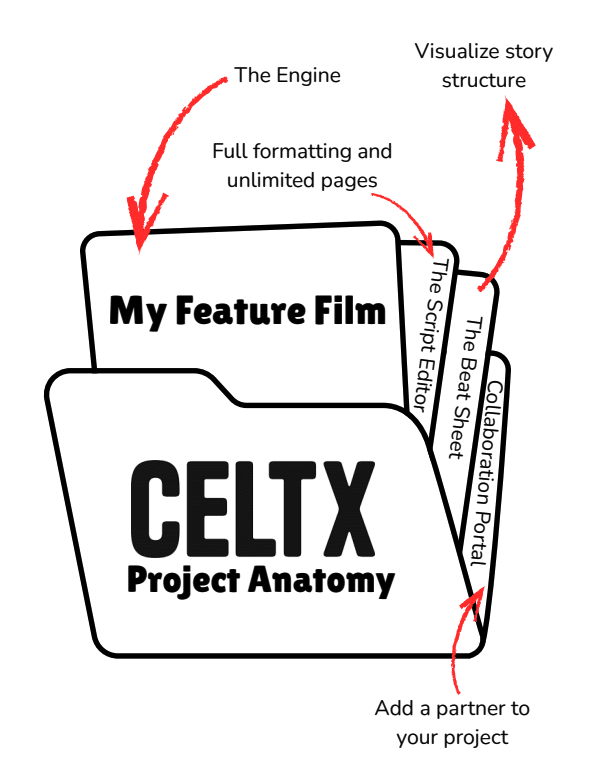
A Celtx project isn’t a traditional document, but a self‑contained environment where every part of your story from structure, notes and characters to research and revisions, lives side‑by‑side with the script itself.
This is one of Celtx’s most distinctive choices. Many writing tools behave like polished versions of Word: one document, one stream of pages. Celtx’s project structure, by contrast, feels more like a digital binder.
Within a single project, you can create character profiles, store location descriptions, organize beats and scene cards, and compile research. These elements link intuitively back to your script, making it easy to reference your planning while drafting.
Even in the free plan, your project functions as a compact writers’ room, giving shape and order to your ideas without forcing you into rigid templates. It’s a workflow that scales well from shorts to features to pilots; the tool adapts to your process rather than the other way around.
Professional Collaboration: How to Co-Write for Free in Celtx
One of Celtx’s biggest advantages over many free scriptwriting tools is the ability to collaborate without paying. That means you can write with a partner—no subscription required, no clunky email attachments, no “VERSION 17 FINAL FINAL CLEAN” filenames.
Here’s how to co-write for free:
First, open your project. Make sure it’s your active project since you only get one.

Click “Share” in the top right-hand corner.

Enter your collaborator’s email address using the email they’ll log into Celtx with.

Choose their permission level
- Read (they can review but not edit)
- Edit (for true co-writing)
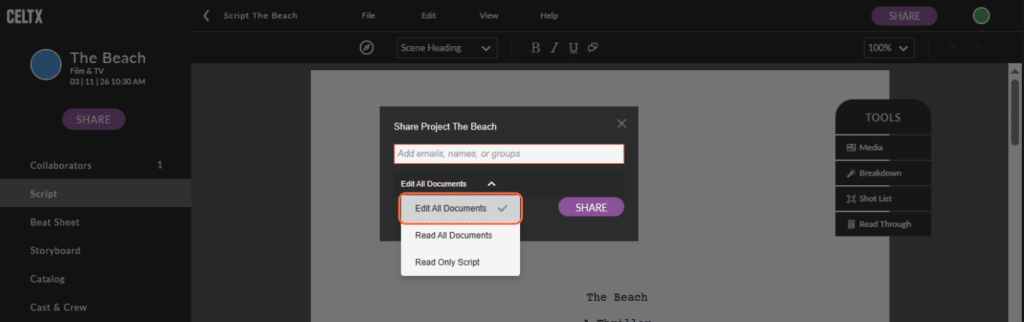
Send the invite. They’ll receive an email prompting them to join the project.

Write together in real time. You’ll see each other’s cursors, live changes, and comments as you work. Use revision mode and comments for discussion to keep conversations tidy and connected directly to scenes. This is especially helpful for rewriting sessions.
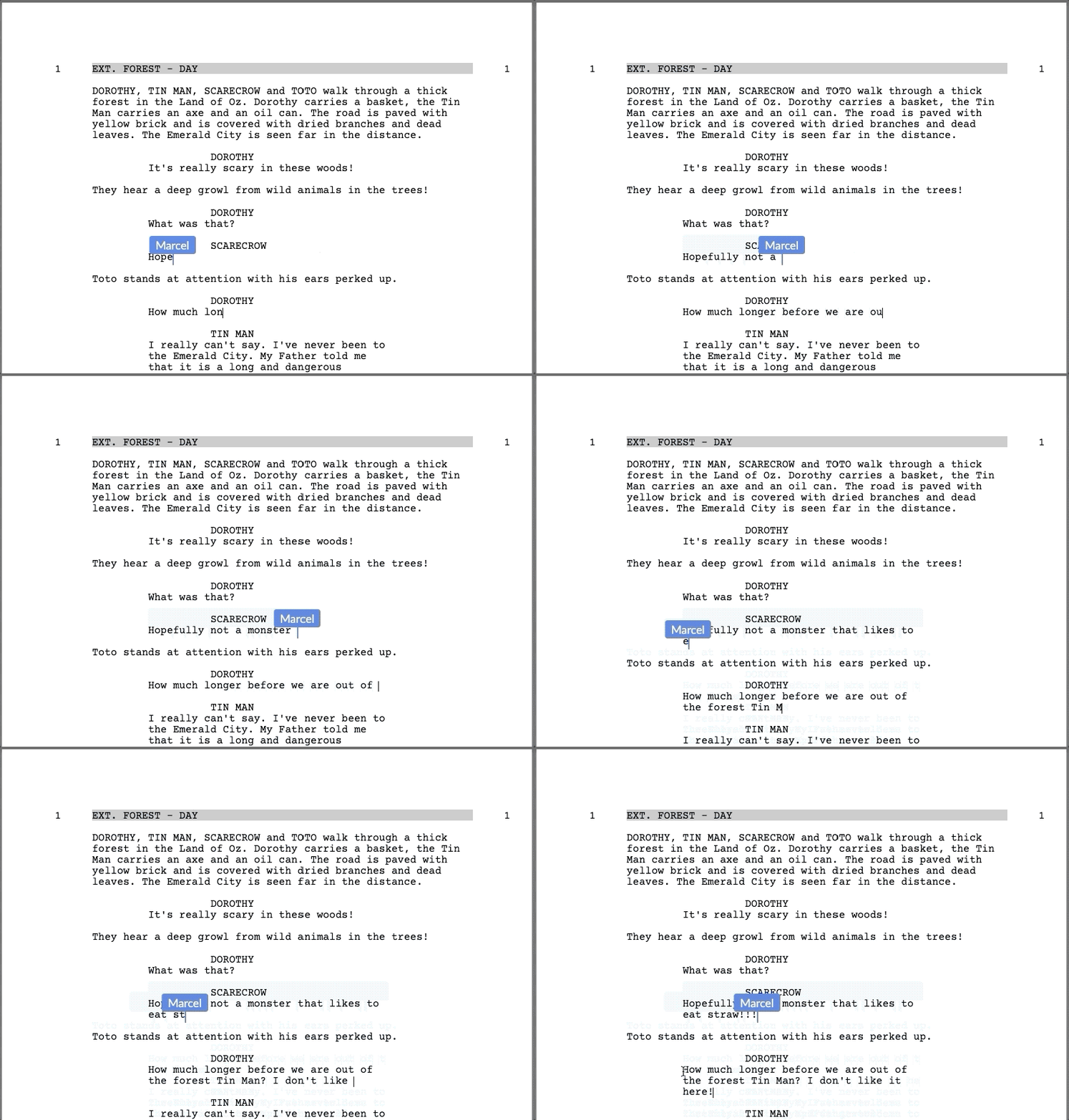

The best part is your collaborator also doesn’t need a paid plan to work with you. Their access is tied to your project, not to their subscription. This makes Celtx one of the most accessible co-writing platforms available.
Celtx Free vs. Paid: When Your Production Outgrows the Sandbox
While Celtx Free is ideal for screenwriting, there comes a point in production where you need more. If you’re developing a slate of projects, preparing a shoot, or handling multiple client scripts, the limitations will become clear. Paid Celtx plans open the door to professional production workflows, including shot lists, scheduling, budgeting, breakdowns, and call sheet creation. These tools are essential once your script enters pre‑production.
Multiple active projects are another major upgrade. If you’re running a production company, building a portfolio, or simply writing more than one piece at a time, the single‑project limitation becomes restrictive. Paid plans also expand your outlining and worldbuilding options, add team management features, and provide more sophisticated export and storage tools.
In short: the free plan is for writing; the paid plan is for producing. You can comfortably take a script from concept to polished draft in the free plan but bringing that script to set is where the paid tiers shine.
Step-by-Step: Getting the Most Out of Your Free Celtx Project
If you’re ready to jump in, here’s a simple, effective workflow that makes the most of Celtx’s free tools.
How to get the most out of the Celtx Free Plan
- Set Up Your Project with a Clear Foundation
Begin by creating a new project in Celtx and selecting the script format that matches what you’re writing. This initial setup shapes your entire workspace, so give your project a clear, specific title that reflects what you’re developing.
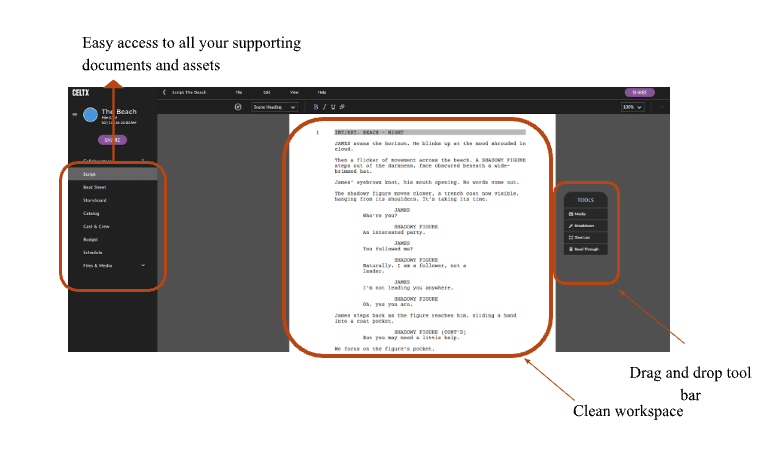
Once inside, take a moment to familiarize yourself with the different sections on the sidebar. Treat this step like opening a fresh notebook: it’s your clean slate, and the way you set it up now will help you stay organized as the project grows. - Use Celtx’s Planning Tools to Build Your Structure
Before diving into dialogue and scene work, spend time outlining your story using Celtx’s built‑in planning features.
Tools like the beat sheet, index cards, and scene list allow you to map out your major turning points, emotional beats, and rising tension before you commit to pages. This kind of early planning reduces structural problems later and gives you a more confident sense of direction.
With everything contained in a single project, you can easily reference your outline as your script evolves, keeping your narrative consistent and intentional. - Develop Your Characters Inside the Project
Character development is an essential part of Celtx’s workflow, and the free plan gives you plenty of room to build out the people who drive your story. Use the character pages to note their goals, contradictions, relationships, and backstory.
These details sit just a click away as you write, providing useful reminders about motivations and arcs. Having your character information integrated into the same workspace prevents you from hopping between separate documents and helps maintain continuity across scenes.
It also encourages deeper, more cohesive characterization throughout your script. - Draft Your Script with Focus and Flow
When you’re ready to start writing scenes, the Celtx script editor provides an uncluttered, professional environment that automatically formats as you type.
This allows you to focus fully on storytelling rather than wrestling with layout. As you draft, use comments to jot down notes for future revisions such as questions you have, lines that feel temporary, or ideas you don’t want to lose momentum to fix immediately.
This keeps your creative flow intact while still capturing everything you’ll want to revisit in the next pass. With scene navigation built into the editor, you can move around your script effortlessly when adjusting pacing or restructuring. - Export and Archive to Maintain Momentum
Once you’ve finished a draft or reached a significant milestone, export a PDF copy to create an offline backup. Reading your script outside the editor often gives you a fresh perspective and helps you catch pacing issues or formatting discrepancies.
When you’re ready to shift to a new idea, or simply take a break from your current script, use the archive feature to store completed projects safely.
Archiving keeps your workspace clean while preserving all your development work, allowing you to return to any script whenever you’re ready, plus ensuring you only have one project in Celtx Free at any one time.
FAQs About the Celtx Free Plan
Yes. There are no page or word count limits. You can draft an entire feature with full professional formatting.
Yes. Invite as many readers, editors, or co-writers as you want. They also don’t need a paid plan, just a Celtx account.
Absolutely. Celtx stores your project in the cloud, and you can export backups anytime.
Only if you export a PDF or text file. Celtx itself is web-based, so the editor requires internet access.
No. Only your active project slot matters. You can collaborate on someone else’s project even if your own slot is full.
Conclusion
Celtx’s free plan is one of the most generous, writer-friendly tools available for screenwriters today. It gives you everything you need to draft, structure, revise, collaborate, and export a complete script, without spending a penny.
The single-project limit keeps you focused. The cloud-based workspace keeps you organized. The collaboration tools keep you connected. And the minimalist editing experience keeps you writing.
If you’re drafting your first script or your fiftieth, Celtx Free is more than enough to get the job done. And when you’re ready to scale into production with call sheets, budgets, and schedules, the paid plans are there waiting for you.
But for now, focus on one script, one story, and one goal. Finish the project in front of you and Celtx Free gives you the perfect space to do exactly that.
Ready to start writing your next script?
Try Celtx for free today!
Up Next:
How to Write a Script: From Idea to Screenplay
Now that you know what’s possible with a Celtx free account, learn how to start writing your script—from formatting your first scene to building a complete draft.