There are two types of screenwriters: the ones who meticulously plan every beat before typing “FADE IN,” and the ones who dive headfirst into the script and hope structure magically appears somewhere around page 60. Most of us live uncomfortably in between.
That’s exactly where the new Celtx Beat Sheet steps in. But wait, we’re not here to force you into rigid planning or chaotic discovery, but to bridge the gap between the two. It’s a rethinking of how writers actually work: messy ideas first, structure later, and clarity somewhere in the middle.
The 2026 update transforms the Beat Sheet from a loose idea board into a fully integrated storytelling engine to help you see your story, shape it, and (crucially) finish it.
Because let’s be honest: starting scripts is easy. Finishing them? That’s where things fall apart.
In today’s blog, we’ll be exploring the brand-new, shiny Celtx Beat Sheet and how you can use it RIGHT NOW to enhance your next screenplay.
Table of Contents
- The New Beat Sheet – Why We Reimagined the Celtx Beat Sheet for 2026
- Key Features: What’s New in the Update?
- How This Update Takes Your Script to the Next Level
- Pro Tips for Using the New Beat Sheet Framework
- Closing the Loop: Meet the New Script-Syncing Integration
- From Beats to Boards: How Visualization Prevents the ‘Second Act Sag’
- FAQs
- Conclusion
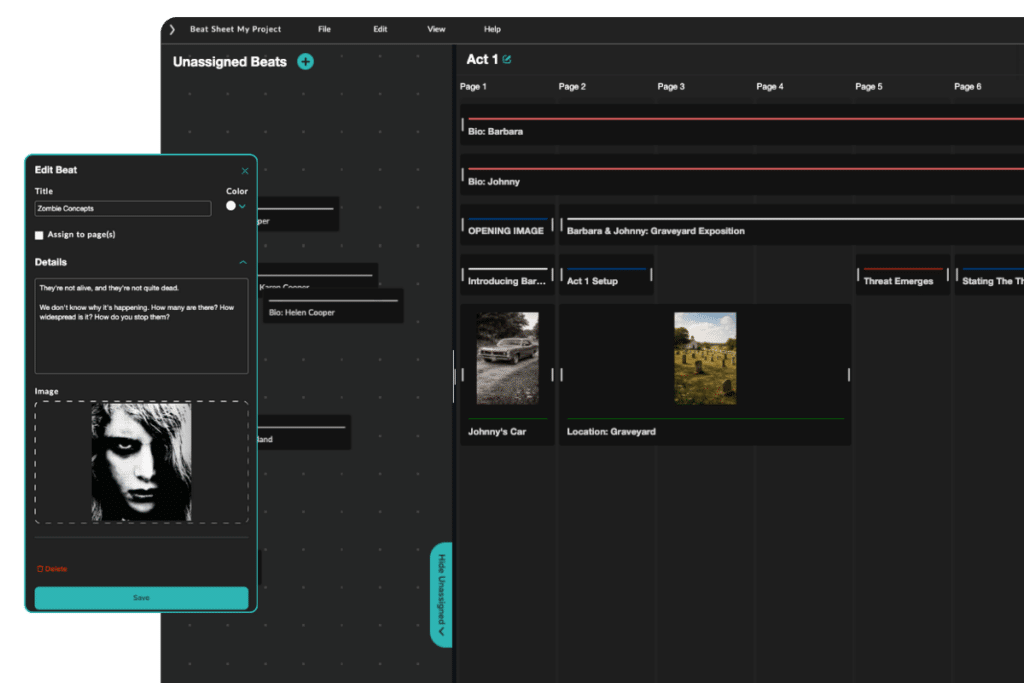
The New Beat Sheet
Why We Reimagined the Celtx Beat Sheet for 2026
The old Beat Sheet had freedom. Lots of it. You could throw ideas anywhere, connect them however you liked, and build your story visually.
But there was a problem: freedom without direction often turns into overwhelm. Writers would end up with sprawling idea boards, disconnected beats, and no clear sense of pacing or structure. That’s where the new Beat Sheet comes in!
Instead of asking you to impose structure onto chaos, it builds structure into the experience itself. Now, you’re working within a framework that naturally guides your story into shape while still leaving room for experimentation.
So, what’s the update actually designed to do? Well, it’s there to:
- Give you clear structural direction
- Improve your awareness of pacing
- Reduce that “where do I even start?” feeling
- Increase your chances of actually finishing your script
- Teach story structure as you use it
Think of it as part writing partner, part teacher, part project manager.
Key Features: What’s New in the Update?
Let’s get into what actually makes this version different, and why it matters when you’re staring at a blank page.
Color-Coding: Your Story at a Glance
Every beat can now be color-coded, and it’s more powerful than it sounds. You’re no longer just writing scenes but also visually tracking key elements such as:
- Character arcs
- Subplots
- Emotional tone shifts
- Themes and motifs

Here at Celtx, we want you to be able to spot imbalance instantly. Too many plot beats and not enough character? You’ll see it. A subplot that disappears for 40 pages? That’ll be very obvious.
Color-coding turns your Beat Sheet into a diagnostic tool as well as a planning space.
Drag-and-Drop: Structure That Moves With You
Writing isn’t linear which means your Beat Sheet shouldn’t be either. With full drag-and-drop functionality, you can:
- Move beats between acts
- Shift pacing in seconds
- Experiment freely without breaking your structure
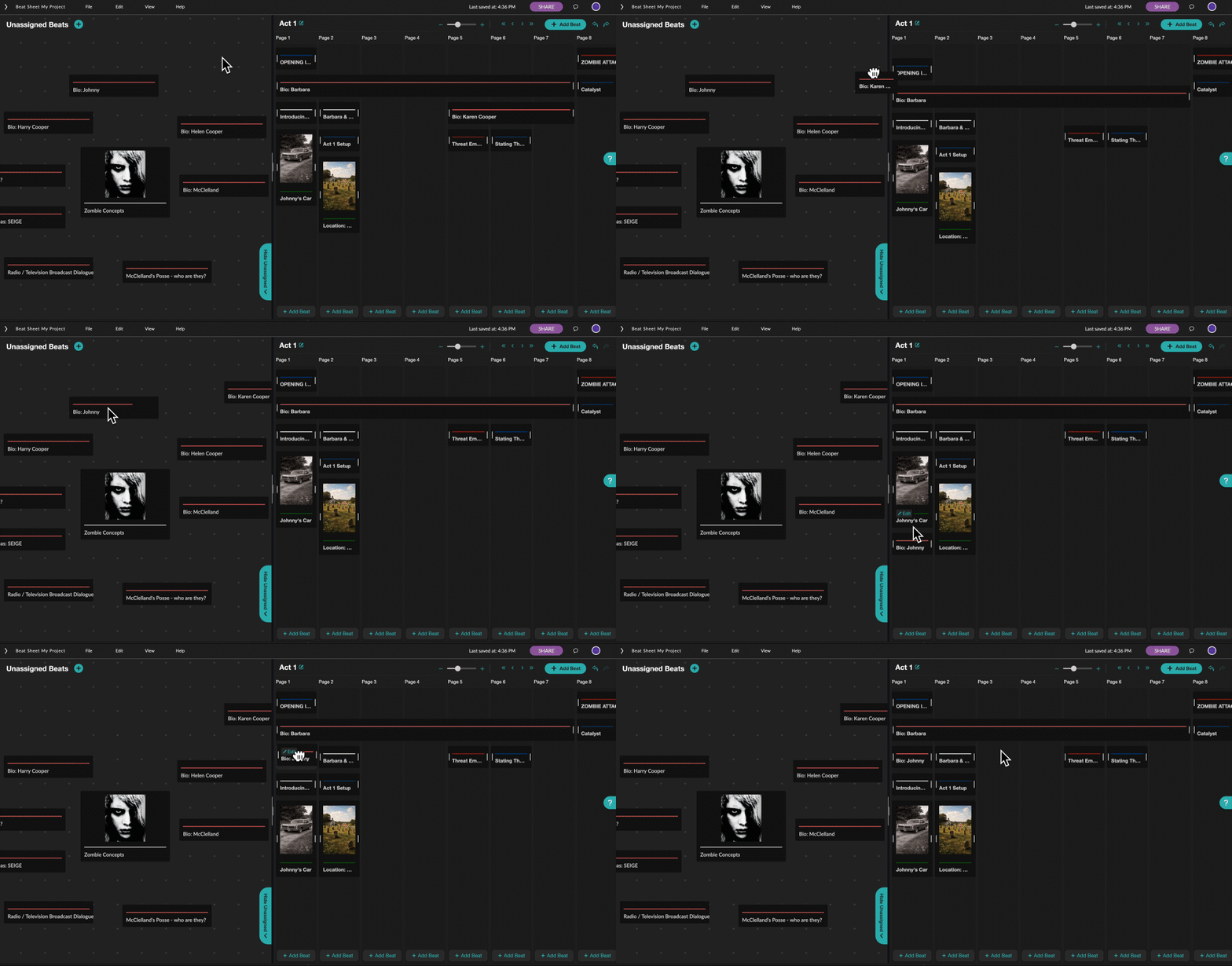
It encourages something writers rarely allow themselves: play. Instead of committing too early, you can test ideas, rearrange sequences, and discover better versions of your story organically.

And because beats can span multiple pages, you can think more in terms of your project as a whole, and that’s where pacing really comes to life.
Script-Syncing: Closing the Creative Loop
This is the big one. Previously, the Beat Sheet and the script felt like two separate worlds. You’d plan in one, write in the other, and constantly bounce between them. Celtx’s new system is designed to close that gap.
With direct integration on the horizon, your beats will connect to your script in a meaningful, navigable way. That means:
- Your outline informs your draft in real time
- Your draft can reference your beats for structure
- You’re no longer rewriting blind but writing with intent
This is what Celtx calls the “Core Creative Loop”, and it’s a gamechanger!
A Powerful Tool for Education
The new Celtx Beat Sheet isn’t just built for working writers, but it’s an incredibly effective teaching tool. For students, it demystifies story structure by making it visible and interactive rather than abstract. Instead of learning acts, pacing, and narrative arcs purely in theory, they can see how a story unfolds across pages and beats in real time.
For educators, it offers a practical way to guide students through the writing process. Instructors can build example beat sheets, break down existing films, or create custom frameworks that students can follow and learn from.
Because the structure is flexible, it works across different experience levels, from beginners learning the basics to more advanced writers refining complex narratives.
Perhaps most importantly, it supports how students naturally learn: through doing. By combining brainstorming, organisation, and visual storytelling in one space, the Beat Sheet encourages experimentation while still reinforcing strong structural habits.
Take the New Celtx Beat Sheet for a Test Drive with a free trial of Celtx!
How This Update Takes Your Script to the Next Level
Okay, so why should you be jumping at the chance to be one of the first to use Celtx’s new and improved Beat Sheet? How does it take your next screenplay from zero to one hundred?
There are so many reasons, but here are the most important!
From Outline to Draft (Without Losing Momentum)
One of the biggest challenges in screenwriting is the transition from planning to writing. You’ve got a solid outline, you know your beats, and everything makes sense. Then you open Celtx, and suddenly everything feels wrong.
The new Beat Sheet smooths that transition. Because your beats are already tied to:
- Page ranges
- Acts
- Structural positioning

The new Beat Sheet means you’re not starting from scratch when you begin drafting. Instead, you’re translating.
- Each beat becomes a launchpad for a scene.
- Each act already has a rhythm.
- Each page range gives you a sense of pacing before you even write dialogue.
Instead of focusing on what happens next, you’re putting your mind on how you can bring your story to life! That shift from what to how is where real writing begins.
Structure Without Rigidity
Here’s the clever part: the Beat Sheet gives you structure without locking you into it.
The default setup uses a classic three-act framework (roughly 30/40/30 pages), but it’s fully customizable. You can:
- Rename acts
- Adjust page counts
- Add or remove acts entirely
So, whether you’re writing a tight 90-page indie or a sprawling genre piece, the framework adapts to you, not the other way around. Neat, right?
It teaches structure by showing it, not forcing it.
Pro Tips for Using the New Beat Sheet Framework
Let’s go beyond the basics. Here’s how to really get the most out of Celtx’s new Beat Sheet.
Start Messy (That’s What the Unassigned View Is For)
The Unassigned View is your creative playground. Use it like a brain dump for random scene ideas, snippets of dialogue, character moments, and half-formed concepts.

Don’t worry about structure yet. Just get it out. Then, when something clicks, drag it into the structured view.
This separation between ideation and organization is subtle, but incredibly powerful. It lets you be both chaotic and disciplined without switching tools.
Think in Pages, Not Just Scenes
Each beat can be tied to a page range. Use that. Instead of asking, “What happens next?” ask:
- How long does this moment need?
- Is this a quick beat or a major sequence?
This helps you avoid one of the most common issues in scripts: uneven pacing.
Use Images to Anchor Tone
You can attach images directly to beats which enhances your written work. Use visuals to:
- Lock in tone
- Define setting
- Capture character energy
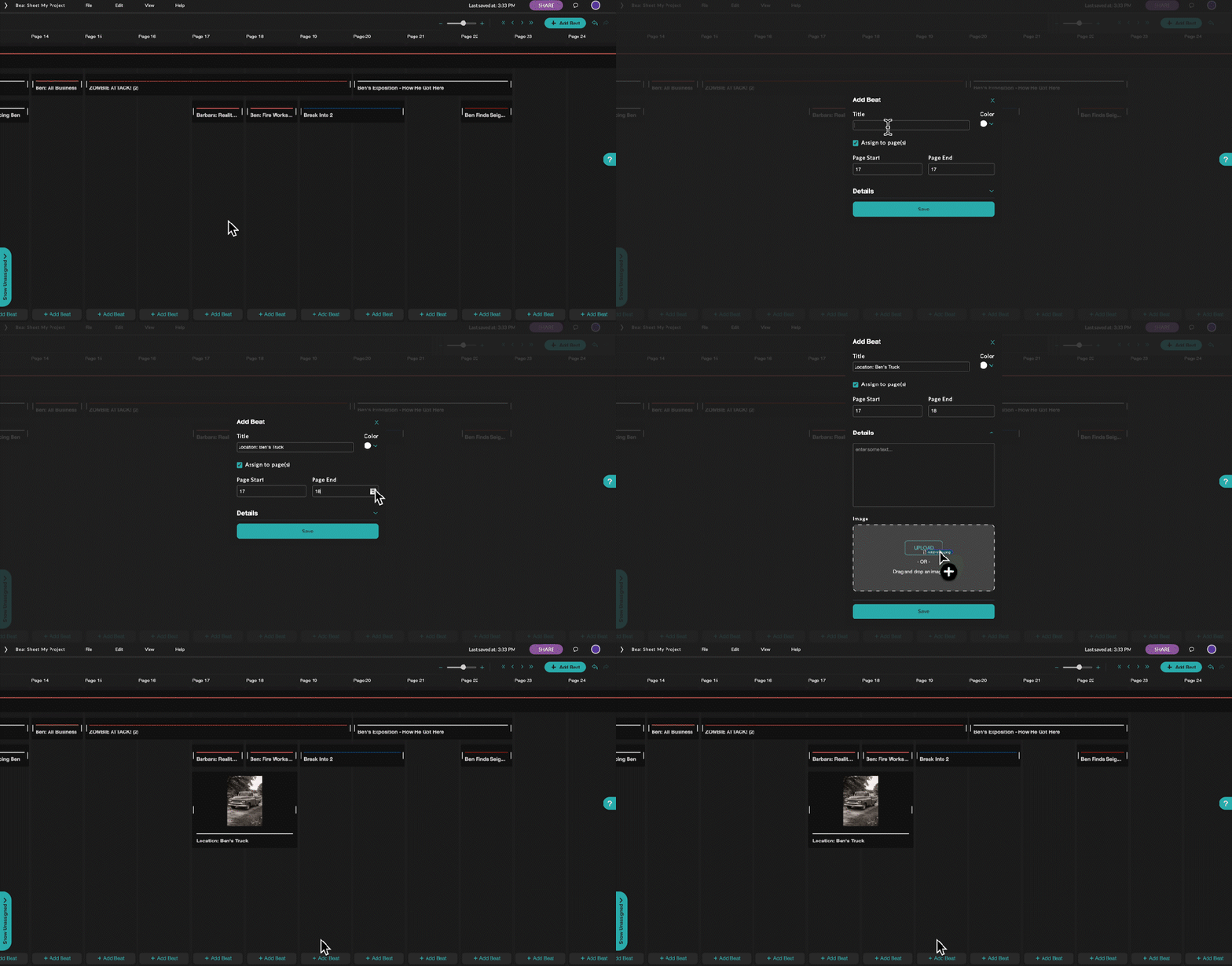
When your story starts drifting, those images pull you back.
Duplicate and Iterate
Got a scene you’re unsure about? Duplicate the beat and try a different version.
The ability to experiment without losing your original idea is huge. It removes the fear of making the “wrong” choice, which is often what stalls writers in the first place.
Closing the Loop: Meet the New Script-Syncing Integration
Up until now, outlining and writing have always felt like two separate worlds. You’d build your roadmap in one space, write your pages in another, and constantly lose your momentum bouncing back and forth between tabs.
We didn’t just want to build a better planning tool—we wanted to close the gap between your ideas and your final draft. That’s why we’re incredibly excited to introduce Script-Syncing and the brand-new Beats Panel, live in your script editor now!
Now, you can open the Beats Panel directly from your tools palette while you write. It automatically syncs to show you the exact beats assigned to the page you’re working on. You can navigate forward or backward, make quick edits, or log brand-new ideas on the fly without ever leaving your script layout.
Want to see exactly how it works in practice? We teamed up with writer and director Brandon Champ Robinson from Imagination Upgraded to break down exactly how this update keeps you from rewriting blind.
Watch the full video tutorial below:
A massive thank you to Brandon for taking the tool for a spin! Be sure to subscribe to Imagination Upgraded for more incredible filmmaking and writing breakdowns.
From Beats to Boards: How Visualization Prevents the ‘Second Act Sag’
Every screenwriter knows the feeling. You start strong with a sharp opening, compelling characters and an inciting incident that lands exactly where it should. Then somewhere in the middle, things begin to drift. The momentum slows, the stakes blur, and suddenly your second act feels less like a gripping escalation and more like narrative quicksand.
This is the infamous “second act sag,” and it’s one of the most common (and frustrating) problems in screenwriting. What makes it particularly tricky is that it often isn’t obvious while you’re writing. On the page, everything can feel fine in isolation. Scene by scene, it works. But zoom out, and the structure lacks shape, progression, and urgency.
Diagnosing Structural Weakness Visually
This is where the new Beat Sheet’s visual approach becomes invaluable. By laying your story beats out across a structured, page-based framework, the Beat Sheet allows you to see your narrative as a whole rather than as a sequence of disconnected scenes. Instead of relying on instinct alone, you’re given a clear, visual representation of how your beats are distributed across acts and page counts.
Patterns start to emerge, and so do problems. A sagging second act often reveals itself visually before it’s ever felt in the script. You might notice long stretches without a major turning point, or clusters of beats that feel repetitive rather than progressive.
Perhaps your midpoint doesn’t stand out, or the escalation between sequences feels flat. These are the kinds of structural issues that are difficult to diagnose in a traditional plot outline but become immediately apparent when mapped visually.
The Power to Experiment and Refine
What’s powerful here is that you’re able identify problems and experiment with solutions quickly and intuitively.
Because the Beat Sheet is fully interactive, you can shift beats around, compress or expand sequences, and test different structural rhythms without committing to a full rewrite. You’re essentially storyboarding your narrative at a structural level, adjusting the flow until it feels right.
This ability to play with structure is crucial because it removes the pressure to get everything perfect on the first try and encourages exploration.
What happens if you move that reveal earlier? What if the midpoint hits harder and changes the direction more dramatically? What if a quieter character moment is actually what’s missing between two high-intensity sequences?
These are the kinds of questions that lead to stronger, more dynamic storytelling. And they’re much easier to answer when you can see the shape of your story in front of you.
Beyond problem-solving, visualization also helps you build rhythm. A well-paced script is about what and when something happens. The spacing of your beats, the rise and fall of tension, the balance between action and reflection; all of this contributes to how an audience experiences your story.
With the Beat Sheet, you can assess that rhythm at a glance. Are your major moments evenly distributed? Does your second act escalate in a meaningful way, or does it plateau? Is your third act set up to deliver a satisfying payoff?
When those elements are in balance, something shifts in your dramatic writing process. You stop second-guessing the structure and start focusing on execution. Instead of pausing to figure out what comes next, you’re moving forward with clarity and confidence. The result is momentum, and momentum is what carries you through the middle of your script without losing energy or direction.
FAQs
Not at all. In fact, it’s especially useful if you aren’t naturally structured. The Unassigned View lets you be as freeform as you like, while the Organizational Layer helps you bring order to the chaos.
No. It’s just the default. You can fully customize your act setup: add more acts, rename them, or reshape the pacing entirely.
They’re still there but just migrated into the new system. Your existing beats will appear in the Unassigned View, ready to be reorganized using the new framework.
Absolutely. That’s a core part of the design. The system intentionally separates brainstorming from structuring so you can do both effectively.
It’s arguably more useful for beginners. Because it doesn’t just help you write but teaches you how story structure works as you go.
Conclusion
The new Celtx Beat Sheet streamlines the journey from idea to draft, balancing creative freedom with clear structure. By making pacing and story shape visible, it removes friction and builds momentum.
The result isn’t just better planning, but finishing scripts faster, with clarity, confidence, and a stronger sense of story.
Ready to start your next project?
Try Celtx’s intuitive beat sheet tool today!
Up Next:
What is a Story Beat: Definition, Examples, and How to Use Them
What makes a story tick? Uncover the significance of story beats, see them in action, and get tips on weaving them into your own tales using the new beat sheet!