Every screenplay starts long before FADE IN appears on the page. It starts in fragments: a moment you can see clearly, a line of dialogue you’ve not yet earned, an ending that may or may not survive the second act. Before structure, before formatting, before drafting, there is the problem every writer must solve first: how do I map this story?
That’s where beat sheets come in. Story mapping tools promise clarity before commitment. They let you sketch the bones of your script without locking yourself into scenes too early.
Two of the most well‑known options come from industry‑standard software: the Celtx Beat Sheet vs. Final Draft Beat Board. Both aim to help writers think visually and structurally, but they approach the task in profoundly different ways.
So which tool actually supports the writing process rather than slowing it down? Which one bridges the gap between idea and draft, and which one leaves you rearranging digital index cards long after you should be writing?
We’ll be answering all these questions in today’s blog!
Table of Contents
- What is the Core Difference Between the Celtx Beat Sheet and the Final Draft Beat Board?
- What is a Beat Sheet (and Why Every Great Script Starts with One)
- Feature Comparison: Analyzing visual storytelling in Celtx vs. Final Draft
- The “Seamless Script” Advantage: Why Integrated Script-syncing Beats a Digital Corkboard
- How to Use the Celtx Beat Sheet to Map Your 3-Act Structure
- Download Your Free Professional Beat Sheet Template
- 3 Pro-Tips for Turning Your Beat Sheet into a First Draft
- FAQ
- Conclusion: Choosing the Right Brain for Your Production

What is the Core Difference Between the Celtx Beat Sheet and the Final Draft Beat Board?
At first glance, the Celtx Beat Sheet and the Final Draft Beat Board seem to occupy the same territory. Both offer a way to outline visually. Both appeal to writers who don’t want to jump straight into script pages. And both are marketed as helpful story‑development tools.
But beneath the surface, they represent two philosophies of writing.
One treats beats as an integral part of the script itself and the other treats beats as a separate planning exercise, useful in theory but detached from the actual writing workflow.
If you’ve ever felt friction between outlining and drafting, the distinction matters more than you might expect.
What is a Beat Sheet (and Why Every Great Script Starts with One)
A beat sheet is a breakdown of a story into its essential narrative moments. Unlike a full outline, which may describe scenes beat‑by‑beat, or a treatment, which leans toward prose, a beat sheet focuses on story turns.
These are the moments when something shifts: a decision is made, a reveal lands, a relationship changes course.
In screenwriting, beat sheets often align with broader structural frameworks: three‑act structure, four‑part structure, or more granular models like Save the Cat or the eight‑sequence method. But the real value of a beat sheet isn’t dogma. It’s clarity.
When you know what happens in your story and why it matters emotionally, drafting becomes less about searching and more about execution.
Importantly, beat sheets are not just for beginners. Professional writers use them precisely because they’re flexible. Beats can be vague at first and sharpen over time. They can change order. They can be cut without rewriting scenes. They are, in many ways, the safest place to experiment.
If you want a deeper dive into what beat sheets are and how professionals use them, you can explore our full guide here: What is a Beat Sheet? The Ultimate Guide to Script Structure
Feature Comparison: Analyzing Visual Storytelling in Celtx vs. Final Draft
The key difference between these tools is all about integration.
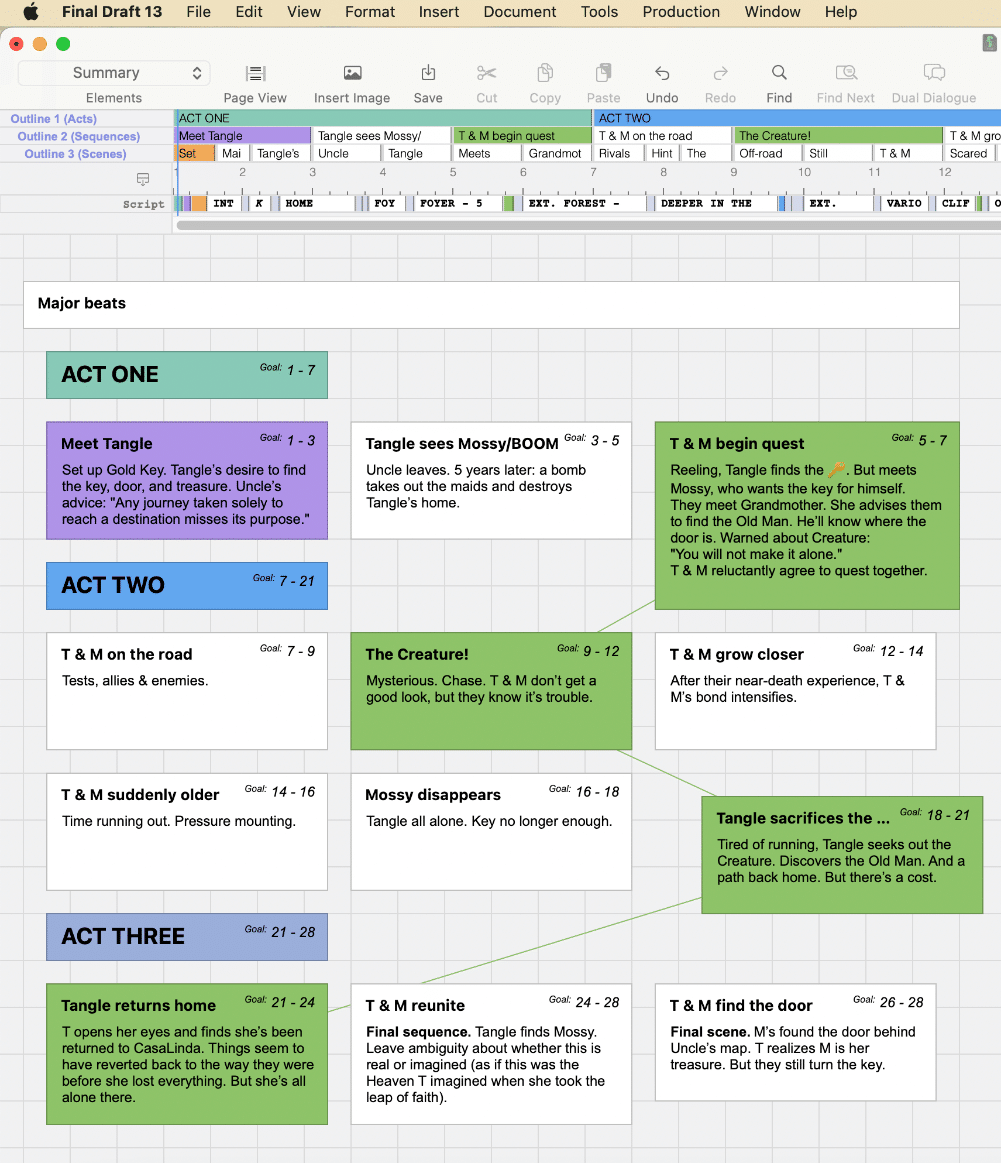
The Final Draft Beat Board functions like a digital corkboard. You create story beats as movable cards, arrange them freely, and optionally colour‑code them. For writers who enjoy pinning index cards to a wall, this can feel familiar. However, the Beat Board exists in parallel to the script. It sits beside the writing process and isn’t separate from it.
The Celtx Beat Sheet, on the other hand, is structurally embedded within the project. Beats are not a separate planning artefact but are part of the same creative ecosystem as your script, index cards, and production documents. This means story development isn’t something you leave behind once you start drafting.
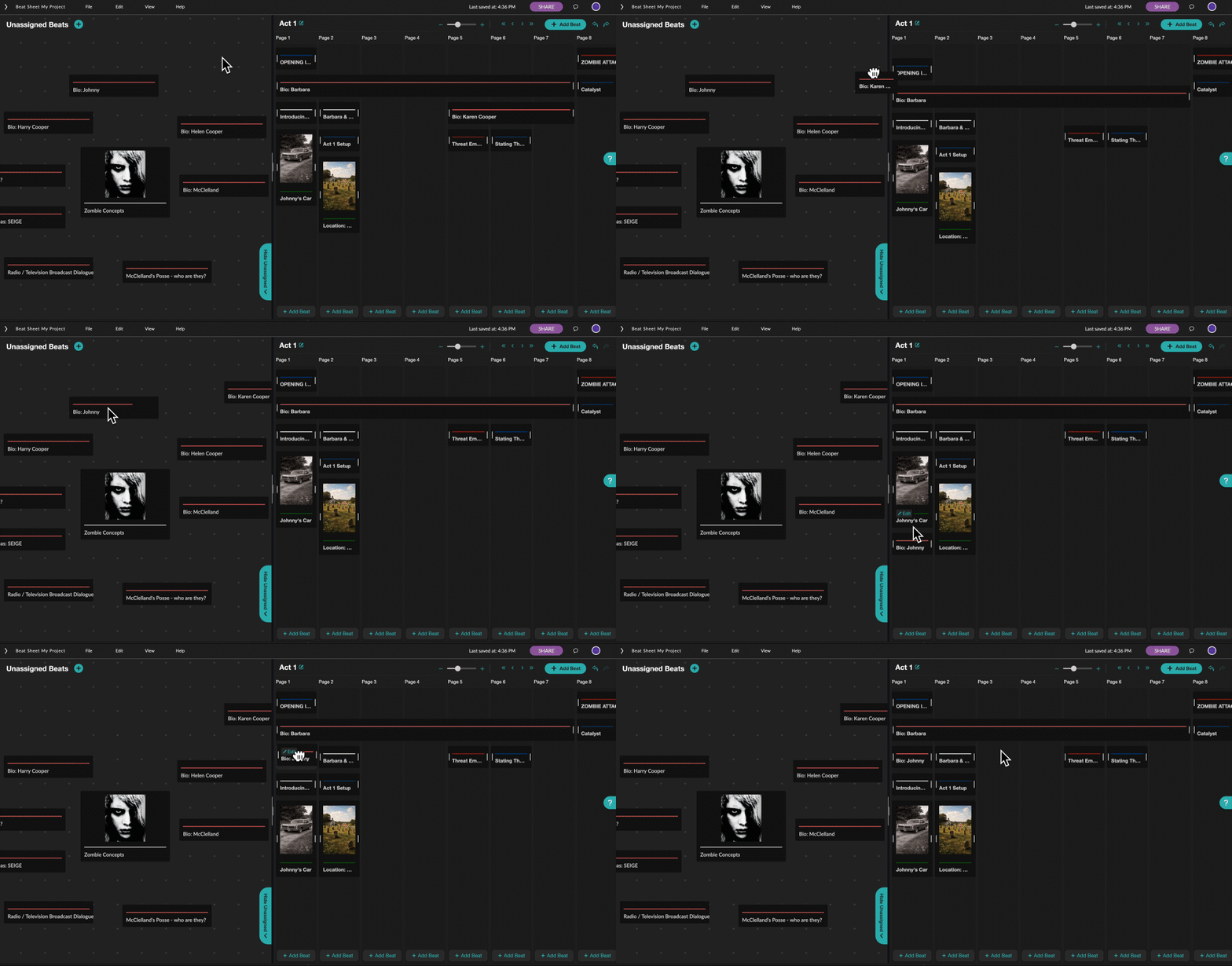
In practical terms, this changes how writers actually use the tool. A Beat Sheet that connects directly to your script invites iteration. A Beat Board that remains isolated often becomes static: a document you once believed in but slowly ignore as the draft takes over.
Another critical distinction lies in how each tool handles structure. Celtx allows you to organise beats by act and track the progression of your story in a way that mirrors professional story development.
Final Draft’s Beat Board is intentionally unstructured. While that freedom may appeal to some writers, it can also leave others reinventing narrative wheels that established frameworks already solve.
The “Seamless Script” Advantage: Why Integrated Script-syncing Beats a Digital Corkboard
One of the most common reasons writers abandon outlines is friction. If moving from planning to drafting feels like copying and pasting ideas from one space into another, momentum dies quickly.
This is where the Celtx Beat Sheet outperforms the competition because the Beat Sheet lives within the same project as your script and a foundation you build on. As beats become clearer, they can inform scenes directly. Your story logic remains visible even when you’re deep in dialogue.
By contrast, the Final Draft Beat Board requires a mental jump. You look at your cards, then you return to your script, hoping the connection holds. For some writers, that separation is motivating. For many others, it becomes a bottleneck.
There’s also a psychological benefit to integration. When your story map and your script are connected, rewriting feels less daunting.
Master your story structure with the brand new Celtx Beat Sheet.
How to Use the Celtx Beat Sheet to Map Your 3-Act Structure
Using the Celtx Beat Sheet effectively is about progression, not perfection. The goal is to understand how your story moves before you worry about how it sounds. Here’s a simple, step‑by‑step approach that mirrors how many professional writers work.
Step 1 | Define the Purpose of Each Act
Start by labelling your three acts in the Beat Sheet.
Act One establishes your protagonist, their ordinary world, and the problem that pulls them into the story. Act Two explores escalation: obstacles, reversals, and rising stakes. Act Three delivers consequence, resolution, and emotional payoff.
Step 2 | Add Broad Beats before Specific Events
Populate each act with high‑level beats that describe what changes, not how it plays out. For example, “Protagonist commits to the goal” or “Relationship fractures under pressure.”
These beats act as narrative signposts and prevent you from getting lost in scene‑level thinking too early.
Step 3 | Identify Your Major Turning Points
Next, refine the structural anchors of your story: the inciting incident, midpoint shift, and climax. Celtx makes it easy to see whether these moments are clearly defined and spaced appropriately. If one act feels overloaded or underdeveloped, the Beat Sheet will show it immediately.
Step 4 | Pressure‑Test Momentum and Logic
Read through the beats in sequence and ask a simple question: Does each beat cause the next one? If a beat feels passive or disconnected, revise it until the story engine feels active and intentional.
Step 5 | Let the Beat Sheet Evolve Alongside the Draft
Once you begin writing scenes, keep returning to the Beat Sheet. Update beats as discoveries are made. In Celtx, this process stays fluid because the Beat Sheet remains part of the same creative workspace as your script.
Download Your Free Professional Beat Sheet Template
Starting a new screenplay with a blank board is the fastest way to hit a creative wall.
To help you move from idea to first draft with confidence, we’ve created a portable 2026 Professional Beat Sheet Template. Designed to align with standard industry pacing, this diagnostic tool helps you map your act breaks, identify your midpoint reversal, and ensure every scene drives your narrative forward. Download your copy below to keep at your desk during your next rewrite.

Click here to download your Free Beat Sheet Template
3 Pro-Tips for Turning Your Beat Sheet into a First Draft
1. Treat Beats as Story Promises
A beat should define why something matters, not dictate exactly how it unfolds. When you sit down to draft, allow the scene to surprise you as long as it fulfils the emotional and narrative promise of the beat. This keeps your writing alive rather than mechanical.
2. Draft Out of Order When It Helps
One of the hidden advantages of a solid beat sheet is freedom from linear drafting. If you know your ending, midpoint, or emotional climax clearly, write it early. Strong anchor scenes give the rest of the draft confidence and direction.
3. Revise the Beat Sheet When Scenes Fight Back
If a scene repeatedly refuses to work, the problem is often structural, not stylistic. Revisit the underlying beat instead of endlessly rewriting dialogue. Celtx’s integrated Beat Sheet makes this kind of course correction faster and far less frustrating.

Want to continue the battle between Celtx and Final Draft? Join us and compare the two in our Celtx vs. Final Draft comparison.
FAQ
Yes. Celtx allows you to export your Beat Sheet, making it easy to share with collaborators, tutors, or producers who want to review story structure without reading the full script.
Not at all. While it’s approachable for new writers, experienced writers often rely on it precisely because it supports fast iteration and disciplined rewrites. All key skills at a professional level.
It can be useful for highly experimental structures, but non‑linear narratives still benefit from understanding cause and effect. Integration, rather than freedom alone, tends to support complexity more effectively.
You can but most writers who try eventually return to some form of story mapping. A beat sheet simply makes that thinking visible instead of internal and error‑prone. It’s a great educational tool to help you build your stories.
If mapping your story by hand helps you think more clearly, don’t forget to download our easy-to-use Screenplay Beat Sheet Template gives you space to work through these beats offline before committing to scenes.
Conclusion: Choosing the Right Brain for Your Production
Choosing between the Celtx Beat Sheet and the Final Draft Beat Board is all about workflow philosophy.
If you see story structure as a separate, pre‑writing exercise, a digital corkboard may suffice. But if you believe structure is something you continually refine as you draft, revise, and rewrite, integration matters.
The Celtx Beat Sheet helps you both plan and finish a story. By keeping story mapping and scriptwriting in the same creative space, Celtx reduces friction, supports professional story development habits, and encourages writers to move confidently from idea to draft.
Ready to map your script and carry the structure through FADE OUT?
The Celtx Beat Sheet is built to get you there.
Learn more about the Celtx Beat Sheet:
What is a Beat Sheet? The Ultimate Guide to Script Structure
Learn how to use this essential screenwriting tool to map your story’s pacing, manage acts, and visualize your script before you write.